
International · International transport
International trips on the same screen as domestic
International trips live in the same record as domestic operations: 4 trip directions, 5 transport modes, MRN (NCTS), T1/T2 and TIR carnet, 7-step customs status tracking, automatic CMR and expiry checks for 19 vehicle and driver document types.
Export, import, transit
Direction, mode, country, border crossing and Incoterms in a single operation record.
Automatic CMR
Generate the CMR consignment note from the saved operation in one click.
Foreign-currency freight
The CBRT rate is stored with the record and isn't overwritten when the record is reopened.
Document expiry control
Expired CEMT, ATP, visa or ADR documents trigger an alert before the trip.
Who is it for?
For international transport companies
Manage export, import and transit trips from the same screen as your domestic operations. Countries and border gates, Incoterms, HS codes, dangerous and temperature-controlled goods, T1/T2 and TIR carnets, MRN, customs status and foreign-currency freight are held in a single record, and vehicle and driver documents are checked against the trip date.
What do you get?
- Export, import and transit operations
- Customs status, T1/T2, TIR carnet and MRN
- Automatic CMR from the operation
- Foreign-currency freight at CBRT rates
Product tour
Meet the International screens
The screens below walk through a real workflow step by step. Click any image to enlarge it.
International Operation Entry on One Screen
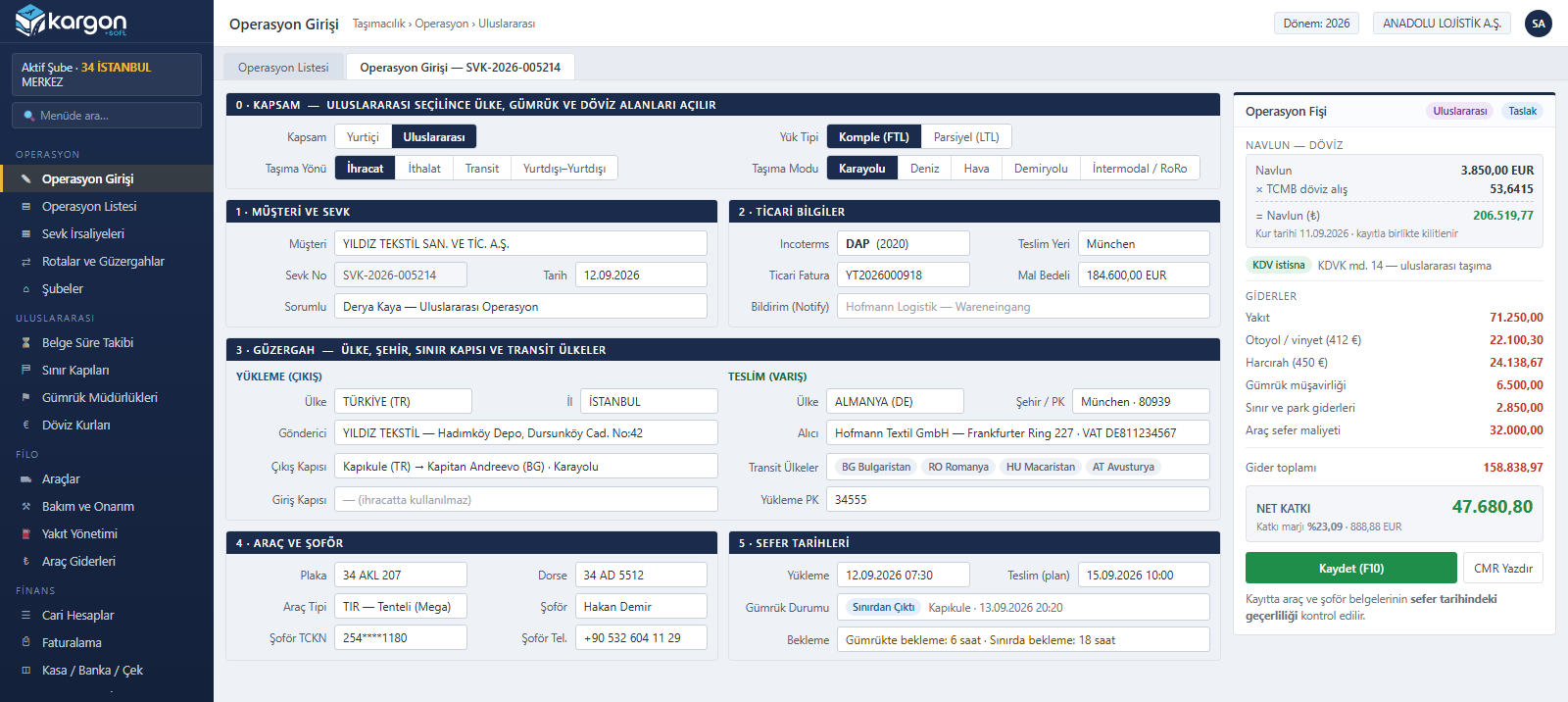
When the scope is set to international, the operation screen adds transport direction (export, import, transit), transport mode, loading and delivery countries, border gate, transit countries and Incoterms. Freight is entered in foreign currency; its TRY equivalent is calculated instantly at the Central Bank (TCMB) rate, the rate is stored with the record and the VAT exemption is applied.
Customs, Transit Documents and Waiting Times
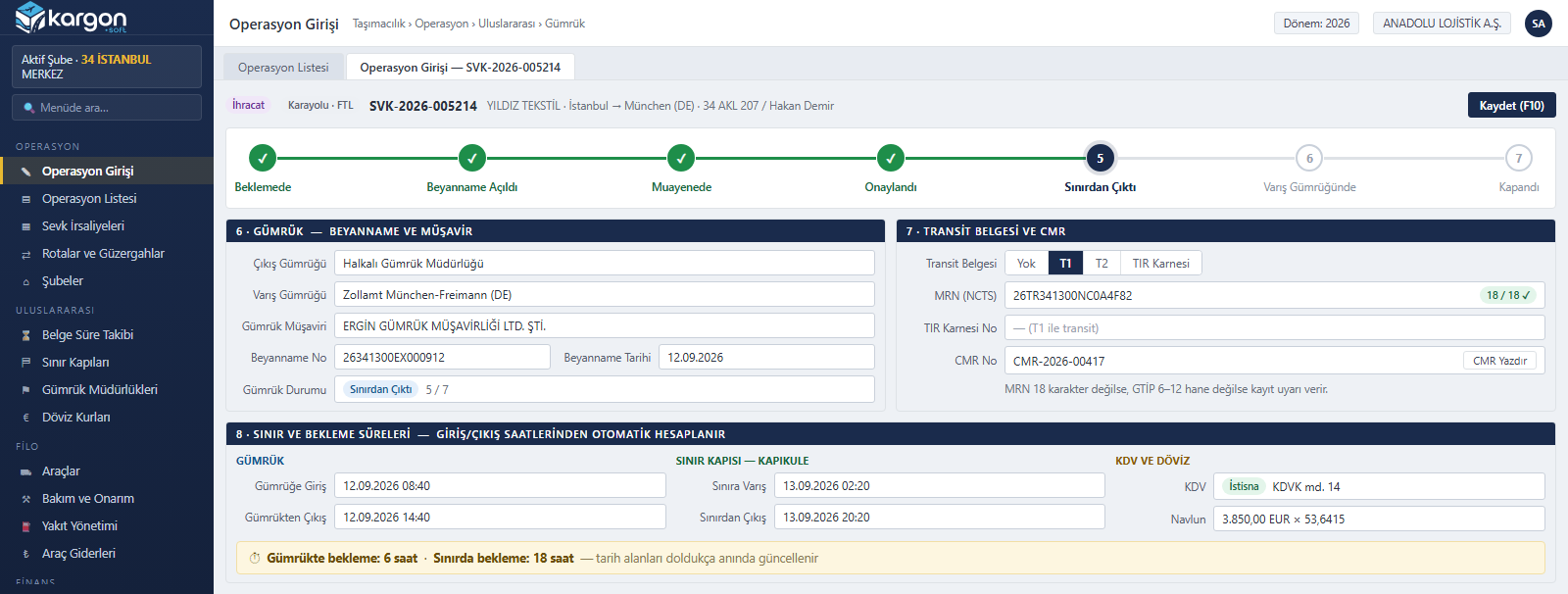
Departure and destination customs, the customs broker and declaration details are kept with the operation. T1, T2 or a TIR carnet is selected and the 18-character MRN is validated. Customs status is tracked in seven stages, and waiting times are calculated automatically from customs and border entry and exit times.
Cargo, ADR and Temperature-Controlled Loads
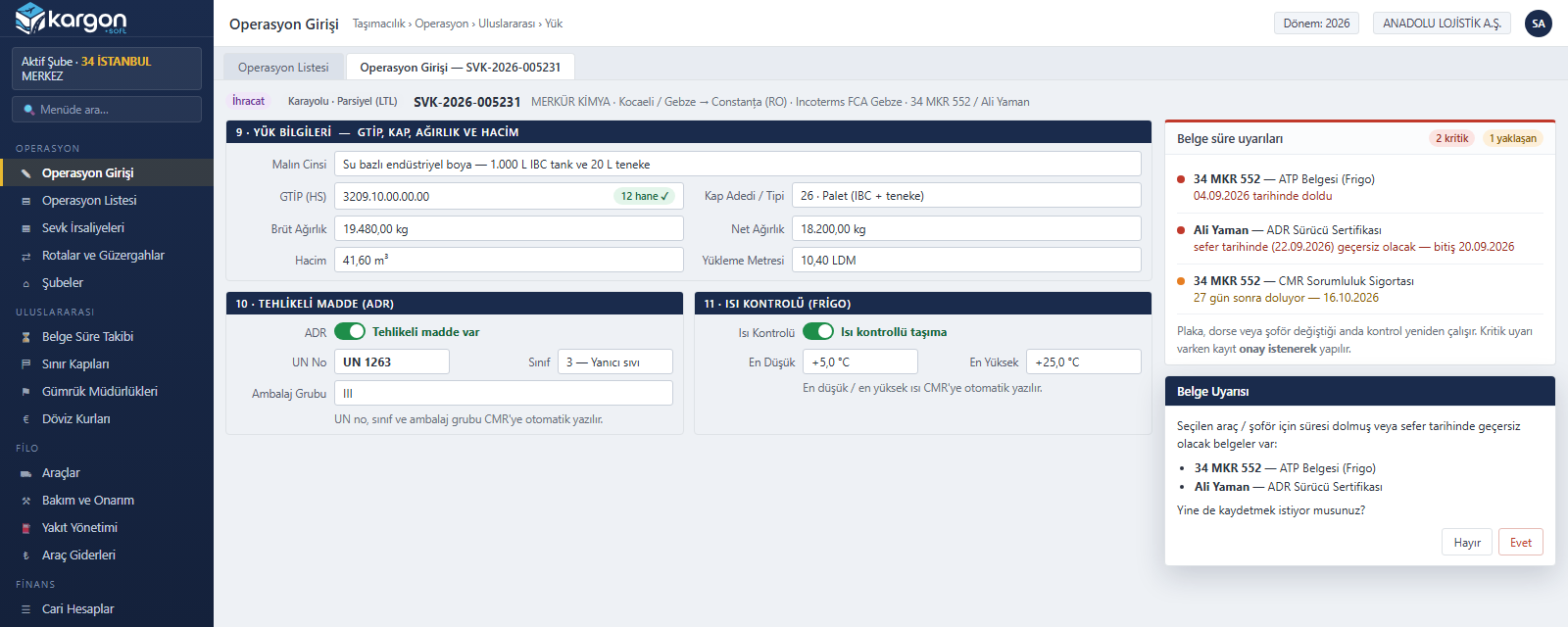
HS code, package count, gross and net weight, volume and loading metres are entered, and the HS code length is checked. For dangerous goods the UN number, class and packing group are held; for temperature-controlled loads the minimum and maximum temperature. If a document of the selected vehicle or driver is invalid on the trip date, a warning appears before saving.
Vehicle and Driver Document Expiry Tracking
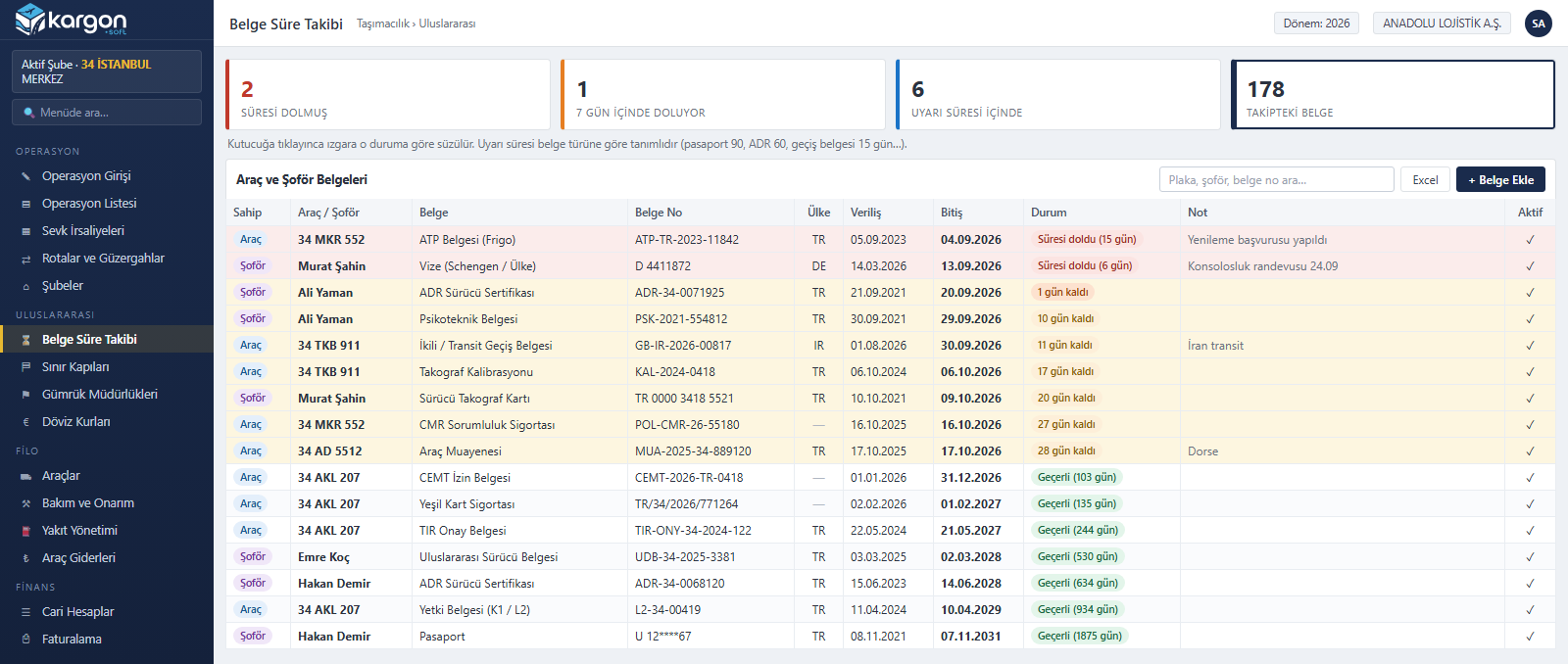
Vehicle documents such as CEMT permits, TIR approval, ATP, green card, CMR insurance and tachograph calibration, and driver documents such as passports, visas, ADR certificates and tachograph cards are tracked by expiry date. Each document type has its own warning period; expired documents, those expiring within seven days and those inside the warning period are filtered with one click.
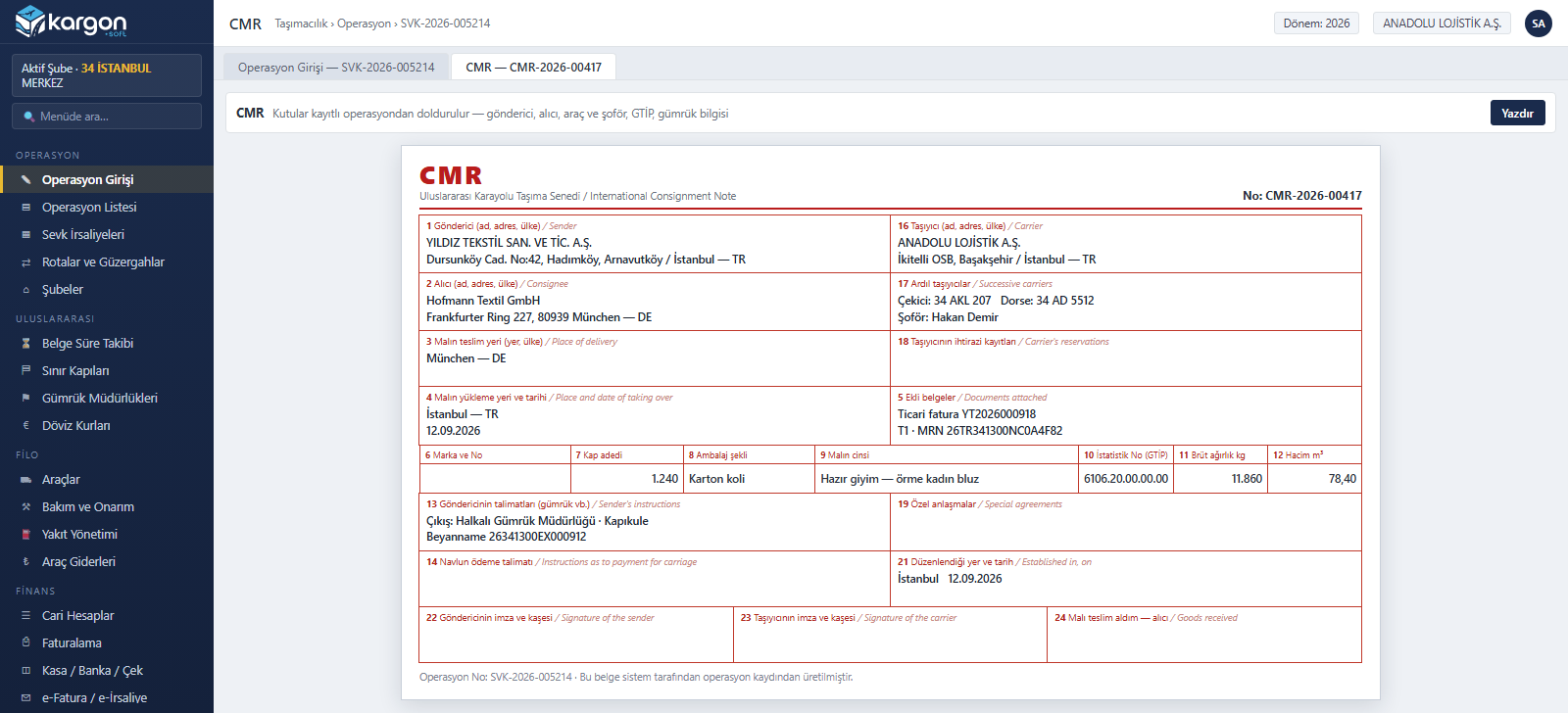
Automatic CMR from the Operation
A CMR consignment note is produced from the saved operation in one click. Sender, consignee, carrier, truck, trailer and driver, place of loading and delivery, HS code, package count, gross weight, volume and customs instructions fill the boxes automatically; dangerous goods and temperature details are added on a separate line when present.
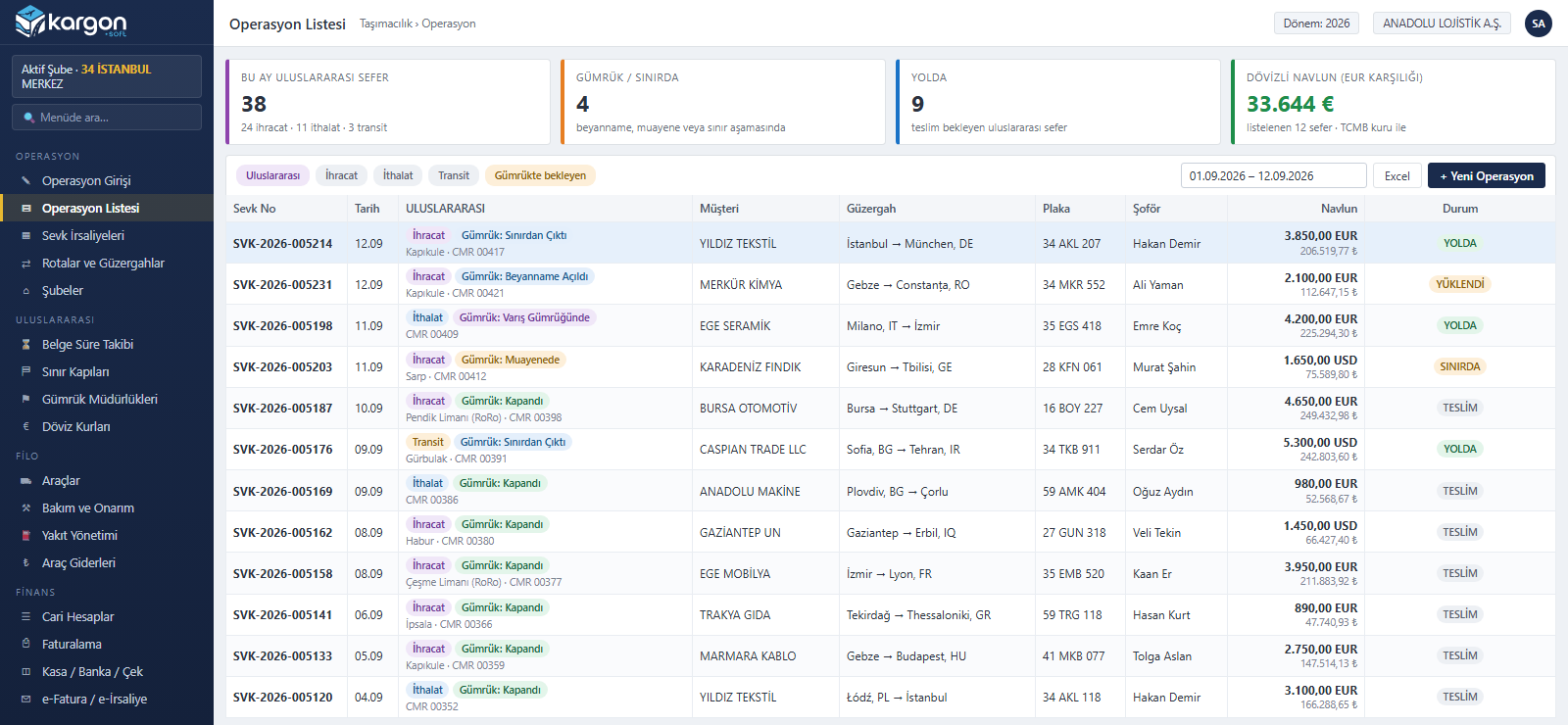
International Operation List
The international column in the operation list shows each trip's direction, customs status, exit border gate and CMR number in a single cell. Freight is listed in its currency and in TRY; trips waiting at customs or on the road stand out immediately, and the list can be exported to Excel.
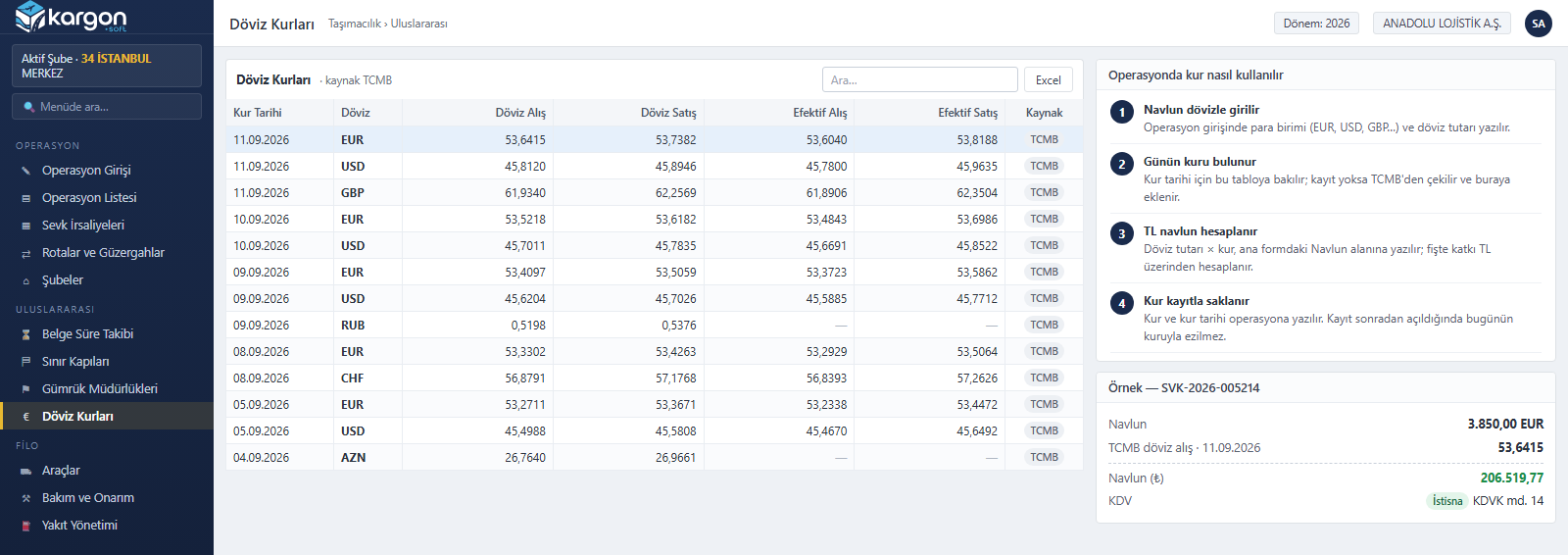
Central Bank (TCMB) Exchange Rates
When foreign-currency freight is entered, that day's rate is read from this table; if it is missing, it is fetched from the Central Bank of the Republic of Türkiye and stored. EUR, USD, GBP and other defined currencies are supported. The rate and its date are written to the operation, so reopening a record never overwrites it with today's rate.
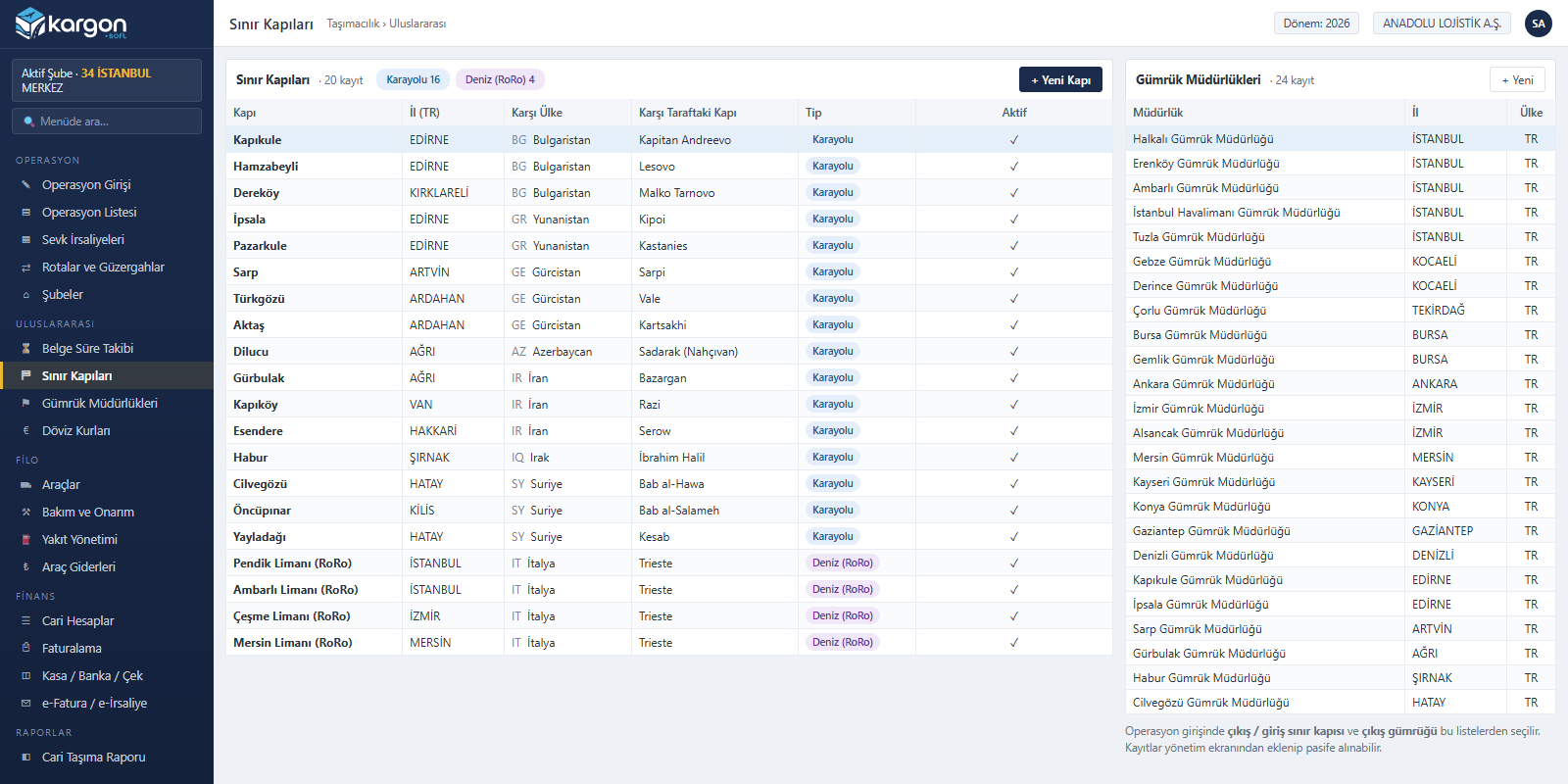
Border Gates and Customs Offices
Land border gates such as Kapıkule, Sarp, Gürbulak and Habur, together with RoRo ports, come ready with the neighbouring country and the gate on the other side. Along with customs offices they serve as selection lists in operation entry; new records can be added and unused ones deactivated.
Trip, cargo and customs details in a single record
Trip definition
- Direction: export, import, transit, cross-trade
- Mode: road, sea, air, rail, RoRo
- Load type: full (FTL) / partial (LTL)
- Loading / unloading country, city, postal code
- Exit and entry border crossings, transit countries
Commercial and cargo details
- Incoterms, commercial invoice, goods value
- HS code, number of packages, gross / net kg, m³, loading meters
- ADR dangerous goods information
- Temperature details for reefer loads
- Freight currency, exchange rate and VAT exemption (art. 14)
Customs
- Customs declaration no., MRN (NCTS)
- T1 / T2 transit and TIR carnet
- CMR number and CMR document printout
- 7-step customs status tracking
- 20 border crossings (including RoRo ports), 14 customs offices
Vehicle and driver documents
During operation entry, expired documents for the vehicle, trailer and driver are flagged before the record is saved.
Vehicle documents
Authorization certificate (K1 / L2) · CEMT · transit permit · TIR approval certificate · green card · compulsory traffic insurance · CMR insurance · comprehensive (casco) insurance · roadworthiness inspection · tachograph calibration · ATP (reefer)
Driver documents
Passport · visa · SRC4 certificate · psychotechnical certificate · ADR · tachograph card · driving licence · international driving permit
Modules
All Modules on One Screen
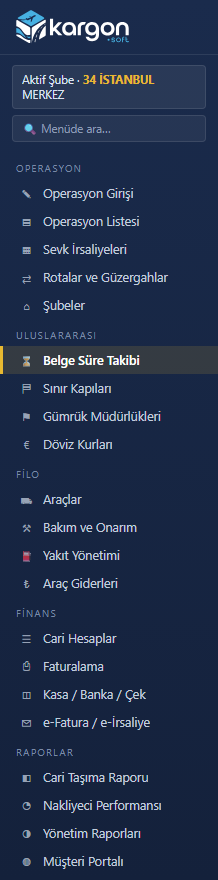
The international module runs on the same platform as the domestic operation, fleet, account and invoicing modules: international operation entry, customs and transit tracking, CMR, document expiry tracking, border gates, customs offices and Central Bank exchange rates. The module is enabled per user; users without access do not see these screens.
Other Kargon™ solutions
LTL and Depot Networks
Partial loads (LTL) and branch networks — Consignment acceptance, transfer hubs, courier assignment and inter-branch settlement
Full Truckload (FTL) and Tonnage
Full truckload and tonnage transport — Trips, freight, subcontractors and fleet cost
Warehousing (WMS)
Warehousing and 3PL services — Goods receipt, addressing, consigned stock, billing
Free demo
See your operation running on Kargon
Let's walk through the modules and screens that fit your business model together in a short online meeting.