
Module 01 · Shipment Management
Shipments and Operations
LTL, full truckload (FTL), tonnage and international transport; from the moment of order to delivery and invoicing in a single flow. Every step of a shipment leaves a trace in the system; operations, accounting and management all see the same record.
transport models: LTL, full truckload (FTL), tonnage, international
step shipment lifecycle, from request to collection
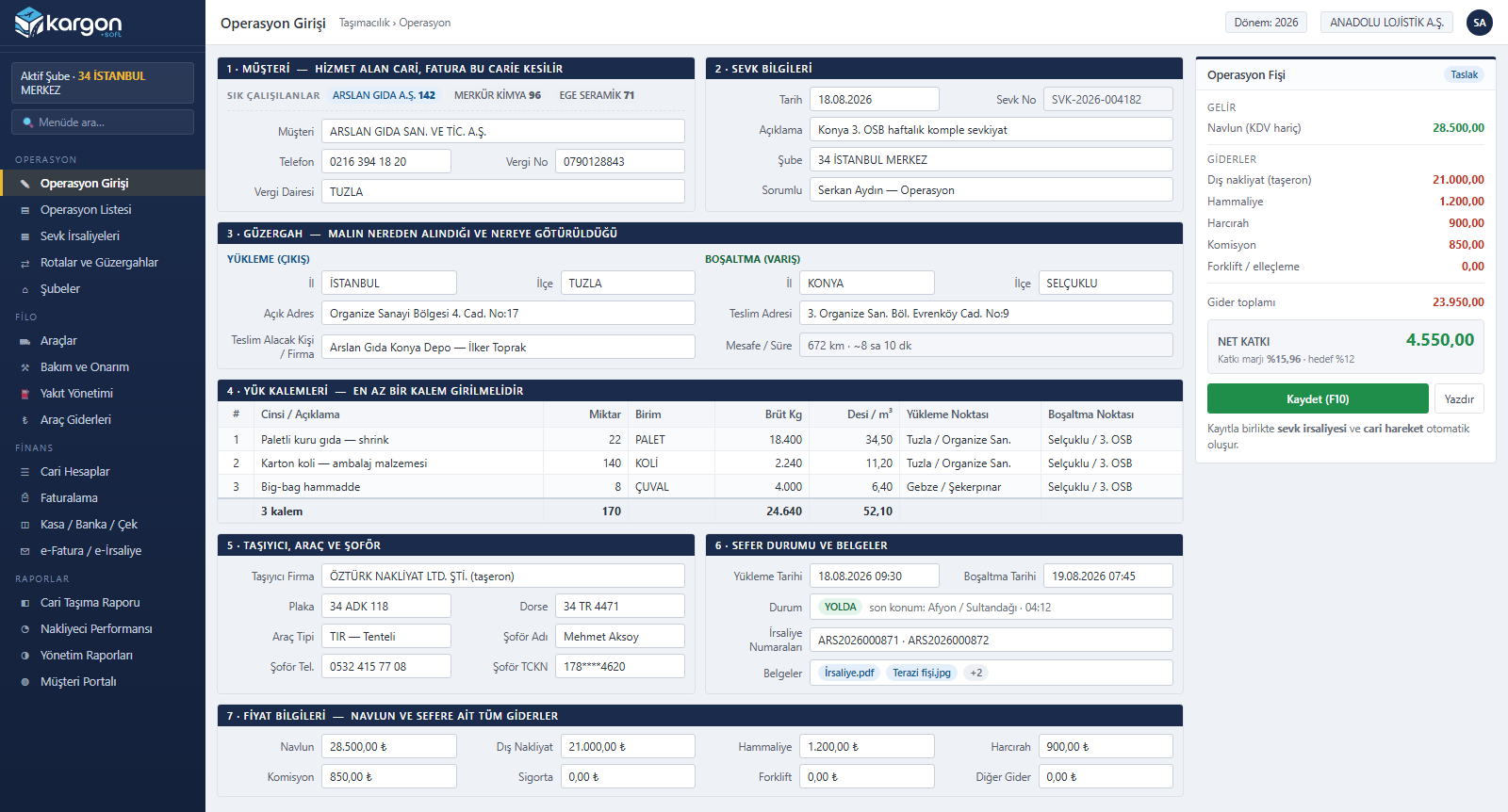
operation entry and live profitability slip in a single form
branch roles: receiving, origin, destination, transfer hub, head office
Module scope
What's in the Shipments and Operations module?
- Operation entry and operation list
- Consignment acceptance (shipment) slip
- Consolidated transport waybill
- Transfer, courier assignment and delivery
- Routes and branch network
- International transport and CMR
1.1 Transport models
Every transport model in one system
From LTL depot networks that collect and distribute partial loads, to industrial customers hiring full trucks, to bulk tonnage hauls and international trips, every business model is managed through the same screens and the same reports.
Partial · LTL
LTL / groupage transport
- Per-shipment consignment acceptance slip; quantity, unit, kg, m³, volumetric weight and barcode per line
- Multiple shipments consolidated on a single vehicle with a consolidated transport waybill
- Receiving, origin, destination, transfer hub and head office branch definitions
- Prepaid, receiver-pays and split payment; sender and receiver sides invoiced separately
- Intermediate haulage and depot transfer fee (% or amount), forklift and handling
- Courier assignment and delivery tracking
Full · FTL
Full truckload transport
- Single-screen operation entry: shipment record and waybill are created together
- Choice of owned vehicle, subcontracted carrier or one-off hired vehicle
- Two separate loading points, full address and consignee contact
- Driver change en route (previous driver, time, note)
- Departure / arrival km, loading, unloading and estimated delivery dates
- Real-time net contribution from freight, subcontractor cost and trip expenses
Tonnage
Tonnage and bulk transport
- Gross kg and m³ on cargo lines; total trip weight summed automatically
- Pricing with configurable units such as ton, kg, pallet, big bag and piece: freight = quantity × unit price
- Load planning against the vehicle card's carrying capacity (kg / m³)
- Weighbridge / scale ticket attached to the trip as a document
- Batch-based shipments with multiple waybill numbers
- Customer-specific price increase rates (by period and branch)
International
International transport
- Export, import, transit and cross-trade trips
- Road, sea, air, rail and RoRo
- Full / partial load type, Incoterms, HS code, loading meters
- CMR document printout, T1/T2, TIR carnet, MRN (NCTS)
- 20 border crossings and 14 customs offices predefined
- ADR dangerous goods and reefer (temperature-controlled) cargo fields
1.2 Process
Shipment lifecycle
Every step of a shipment leaves a trace in the system. Status history is kept separately for both the shipment and the waybill.
-
Request
Customer, route and cargo details; frequently used accounts in one click.
-
Planning
Owned, subcontracted or hired vehicle; driver, trailer and document checks.
-
Loading
Shipment record and waybill; multiple waybill numbers, document attachments.
-
In transit
Status history, driver changes, km and delay alerts.
-
Delivery
Delivery dates, scanned documents, customer portal.
-
Invoice
Per-shipment batch invoicing; e-Invoice / e-Archive.
-
Collection
Account transactions, bank matching, accounting voucher.
Documents
- Number series by branch and year (consignment slips, waybills)
- CMR, consignment slip and waybill list printouts
- Pre-printed form printing on dot-matrix printers
- Multi-page document upload from scanners
Checks
- Expiry alerts for vehicle, trailer and driver documents
- Trips past their delivery time or left open too long
- Alerts for missing km and missing trip documents
- Delivered but uninvoiced shipments
Approvals
- Payment type changes require approval from the origin branch
- Role-based page permissions (view, add, edit, delete, export)
- Freight and profit figures visible to managers only
1.3 Screen
Operation entry: a whole trip on one screen
Seven sections in a single form. Freight and all trip expenses are calculated as you type; net contribution and contribution margin are visible before the record is even saved. Driver advances are not counted as expenses, and vehicle fuel and costs are linked to the trip automatically.
- Customer: billed account, tax details; frequently used companies
- Shipment details: date, shipment no., branch, person in charge
- Route: loading and unloading province / district / address
- Cargo lines: type, quantity, unit, gross kg, m³
- Carrier: company, plate, trailer, driver, national ID no.
- Status and documents: dates, waybill numbers, attachments
- Price: freight, external haulage, handling, driver per diem, commission, insurance, forklift
1.4 Depot operations
LTL transport and branch network
In LTL carriers, a shipment is accepted at the origin branch, passes through a transfer hub and is delivered at the destination branch. Kargon™ shows which branch each shipment is at and who will collect payment: origin branch (consignment acceptance slip) → consolidated waybill (linehaul vehicle loading) → transfer hub (intermediate haulage) → destination branch (courier assignment and delivery).
| Topic | How Kargon™ handles it |
|---|---|
| Shipment record | Sender / receiver accounts, 5 separate branch roles, route, line items |
| Payment type | Prepaid (sender), receiver-pays, split between sender and receiver |
| Additional charges | 2 tiers of intermediate haulage, 2 tiers of depot transfer fees; forklift, handling, cargo handling |
| Pricing policy | Contracted / free-of-charge flags; increase rates by branch, period and customer |
| Consolidation | Intra-city and intercity consolidated transport waybills |
| Delivery | Courier assignment list (PDF), delivery status |
| Documents | Debit/credit notes (DKN series), scanned images, pre-printed slip printing |
| Invoicing | Sender and receiver sides tracked separately; a single invoice from selected shipments |
| Inter-branch settlement | Earnings share percentage and signed balance by period and branch pair; revenue share, advance / remaining freight, depot transfer fee |
1.5 Reports
Trip, customer and carrier profitability
All trips in a single table with date, route, customer, plate, driver and invoice status. Net profit = freight excl. VAT − trip expenses − external haulage − vehicle costs. Every report exports to Excel.
By trip
Freight, expenses, external haulage, vehicle cost and net profit.
By customer
Trip count, revenue, net contribution and margin; route density and payment breakdown.
By carrier
For subcontracted carriers: trip count, amount paid, outstanding balance, on-time delivery and delays.
By vehicle
Daily, monthly, yearly or per-trip breakdown; trip count, most frequent route, freight vs. expense comparison.
1.6 International
International transport
International trips live in the same record as domestic operations: 4 trip directions, 5 transport modes, 19 vehicle and driver document types, 20 predefined border crossings and 14 predefined customs offices.
Trip definition
- Direction: export, import, transit, cross-trade
- Mode: road, sea, air, rail, RoRo
- Load type: full (FTL) / partial (LTL)
- Loading / unloading country, city, postal code
- Exit and entry border crossings, transit countries
Commercial and cargo details
- Incoterms, commercial invoice, goods value
- HS code, number of packages, gross / net kg, m³, loading meters
- ADR dangerous goods information
- Temperature details for reefer loads
- Freight currency, exchange rate and VAT exemption (art. 14)
Customs
- Customs declaration no., MRN (NCTS)
- T1 / T2 transit and TIR carnet
- CMR number and CMR document printout
- 7-step customs status tracking
- 20 border crossings (including RoRo ports), 14 customs offices
Vehicle documents
Authorization certificate (K1 / L2) · CEMT · transit permit · TIR approval certificate · green card · compulsory traffic insurance · CMR insurance · comprehensive (casco) insurance · roadworthiness inspection · tachograph calibration · ATP (reefer)
Driver documents
Passport · visa · SRC4 certificate · psychotechnical certificate · ADR · tachograph card · driving licence · international driving permit
Alerts before saving
During operation entry, expired documents for the vehicle, trailer and driver are flagged before the record is saved.
Other modules
Fleet Management
Cost, documents and efficiency of owned and leased vehicles; by trip, by kilometer and by day.
Warehouse Management (WMS)
Compliant records for third-party warehousing, customer-owned consigned stock and monthly warehouse billing.
Accounting
Turkish Uniform Chart of Accounts, template-based automatic vouchers and accounting tied to operations.
Finance and Treasury
Current accounts, cash, bank, cheques/promissory notes, per-shipment invoicing and inter-branch settlement.
e-Documents and Integrations
GİB e-Invoice, e-Archive, e-Waybill; banks, CBRT, handheld terminals, printers and scanners.
HR, Payroll and CRM
Employee cards, leave and sick leave, payroll accrual and payment; lead and activity tracking.
Reporting and Customer Portal
Management (CEO) report, customer transport and carrier reports, report designer and customer tracking portal.
Security and Audit Trail
Role-based permissions, branch visibility, field masking, financial controls and a complete audit trail.
Free demo
See your operation running on Kargon
Let's walk through the modules and screens that fit your business model together in a short online meeting.