
LTL and Depot Networks · Partial loads (LTL) and branch networks
Your LTL transport and depot network, on a single platform
A shipment is accepted at the origin branch, passes through a transfer hub and is delivered at the destination branch. Kargon™ shows which branch each shipment is at and who will collect payment; at period end, branches settle automatically.
From acceptance to delivery
Every shipment is tracked in one record, with status history, from acceptance to recipient.
No more loading errors
An acceptance with a mismatched branch chain can't be linked to the wrong trip.
Automatic settlement
Share percentages, depot transfer fees and intermediate haulage are calculated automatically at period end.
Bulk e-Invoice
Acceptances are invoiced in bulk; the e-Invoice / e-Archive decision is made using the GİB registry.
Who is it for?
For LTL depot networks carrying partial loads
Built for depot carriers that move partial loads across a branch and agency network. From the moment you issue a consignment receipt, through loading onto a vehicle, passing a transfer hub, being assigned to a courier for the consignee and closing inter-branch settlement at period end, the whole chain runs on one platform.
What do you get?
- Acceptance slip and consolidated transport waybill
- Transfer, line-based trip and assignment tracking
- Automatic inter-branch settlement
- Acceptance-based invoicing and e-Invoice
Product tour
Meet the LTL and Depot Networks screens
The screens below walk through a real workflow step by step. Click any image to enlarge it.
Consignment Receipt and Acceptance Details
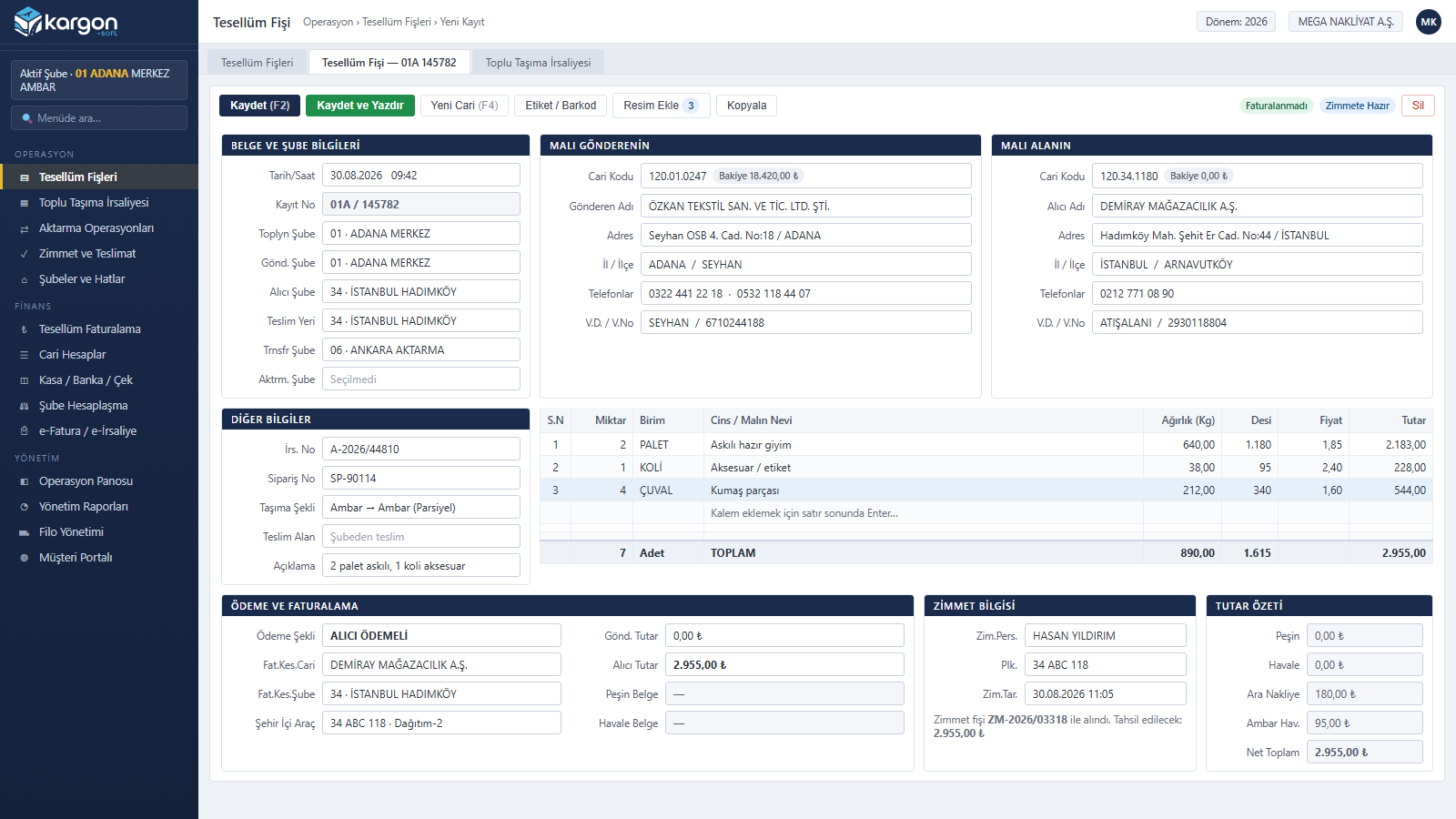
Sender and consignee account details, the collecting–sending–receiving–transfer–hub branch chain and line-level quantity, weight, volumetric weight and amount are entered on a single screen. As soon as the account code is typed, the title, address and tax details fill in; the payment method determines which account and branch gets invoiced. A receipt that has been invoiced or linked to a waybill cannot be deleted.
Bulk Transport Waybill and Linking
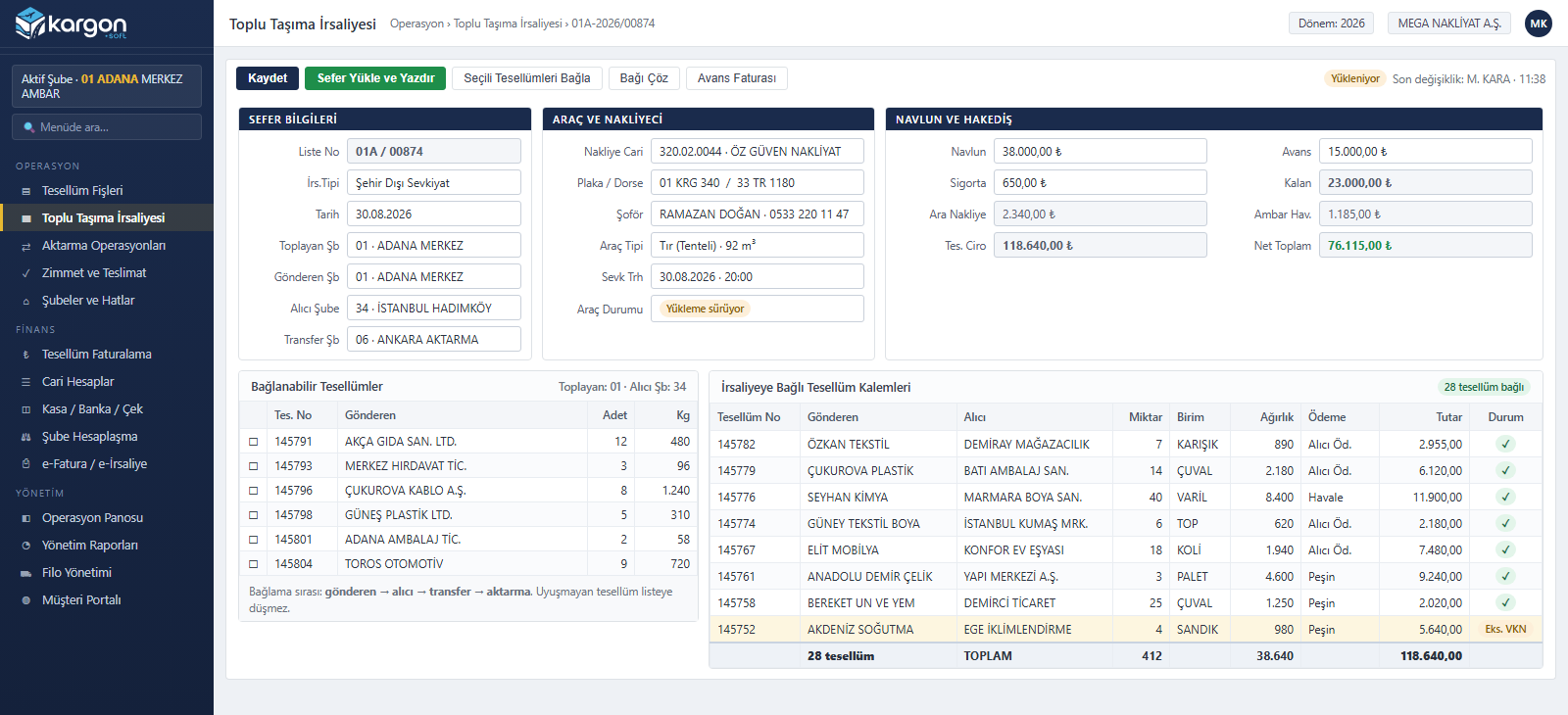
Dozens of consignments loaded onto one vehicle are gathered into a single document. Linking follows the sender→receiver→transfer→hub sequence; a consignment whose branch chain does not match never appears in the list and cannot be loaded onto the wrong trip. Carrier account, plate, driver, freight charge, advance and balance are written onto the waybill, and counts, weights and amounts total instantly.
Transfer Hubs and Line-Based Trip Tracking
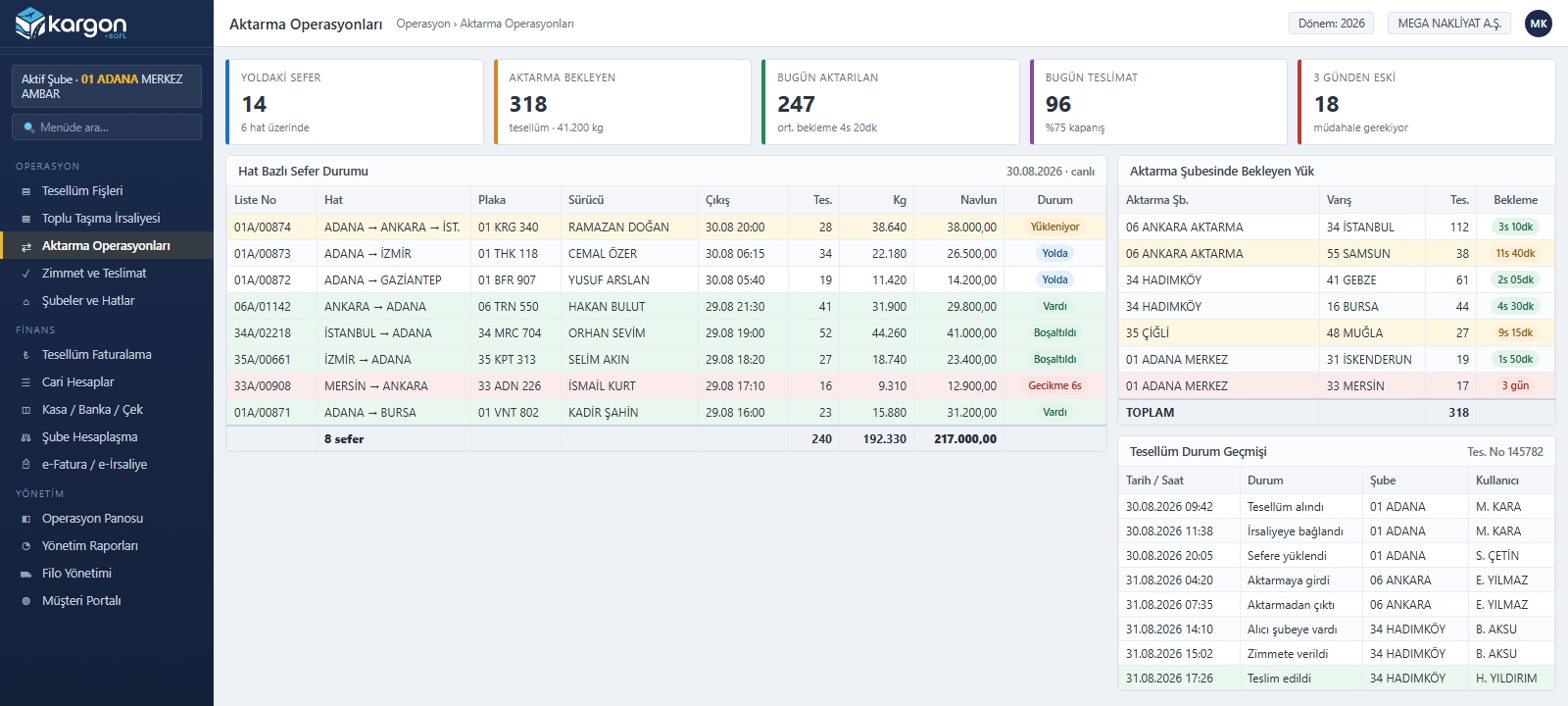
One table shows which trip is where, on which plate, with how many consignments and how many kilos; loading, en route, arrived and delayed statuses are separated. Cargo waiting at a transfer hub is listed by destination province and waiting time. The status history of a single shipment is traceable by date, branch and user.
Delivery Assignment and Handover Tracking
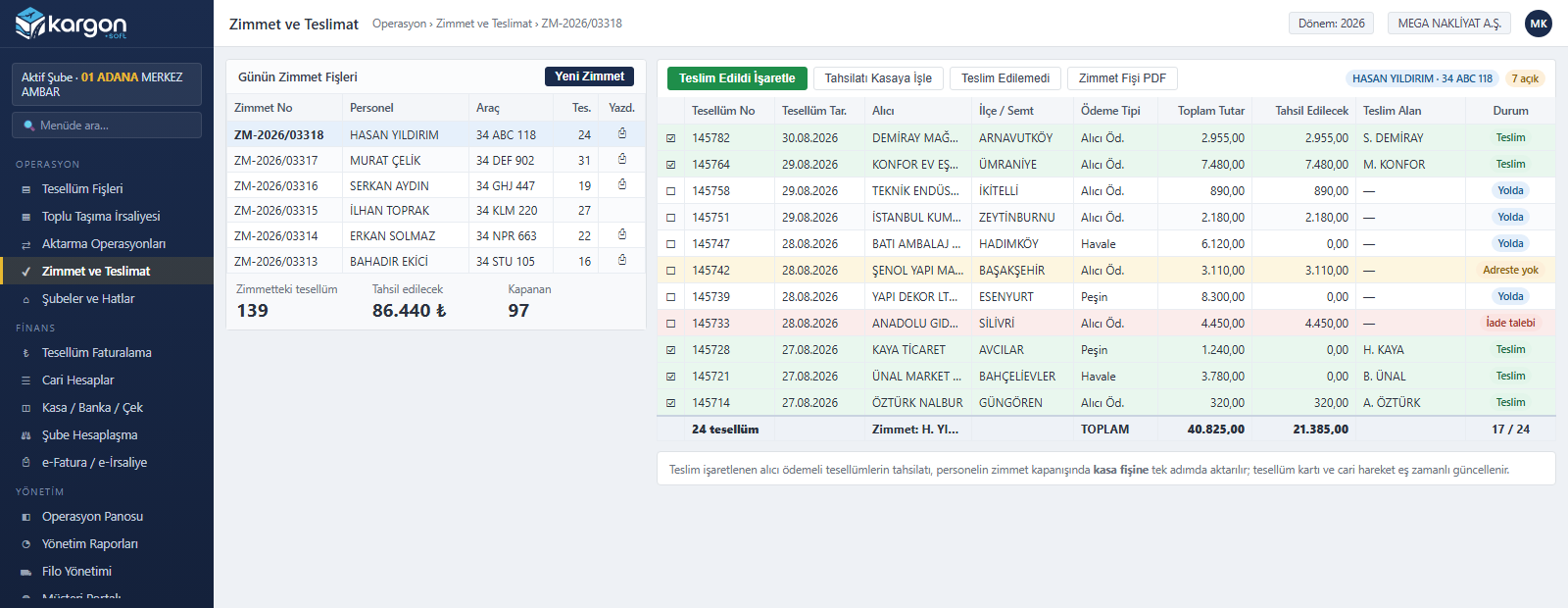
Consignments are assigned in bulk to a delivery courier and vehicle; each row shows the total amount and the amount to be collected separately. Delivered, undeliverable and return-requested records are separated by colour. When an assignment is closed, cash-on-delivery collection is posted to the cash voucher in one step and the current account entry is created at the same time.
Automatic Inter-Branch Settlement
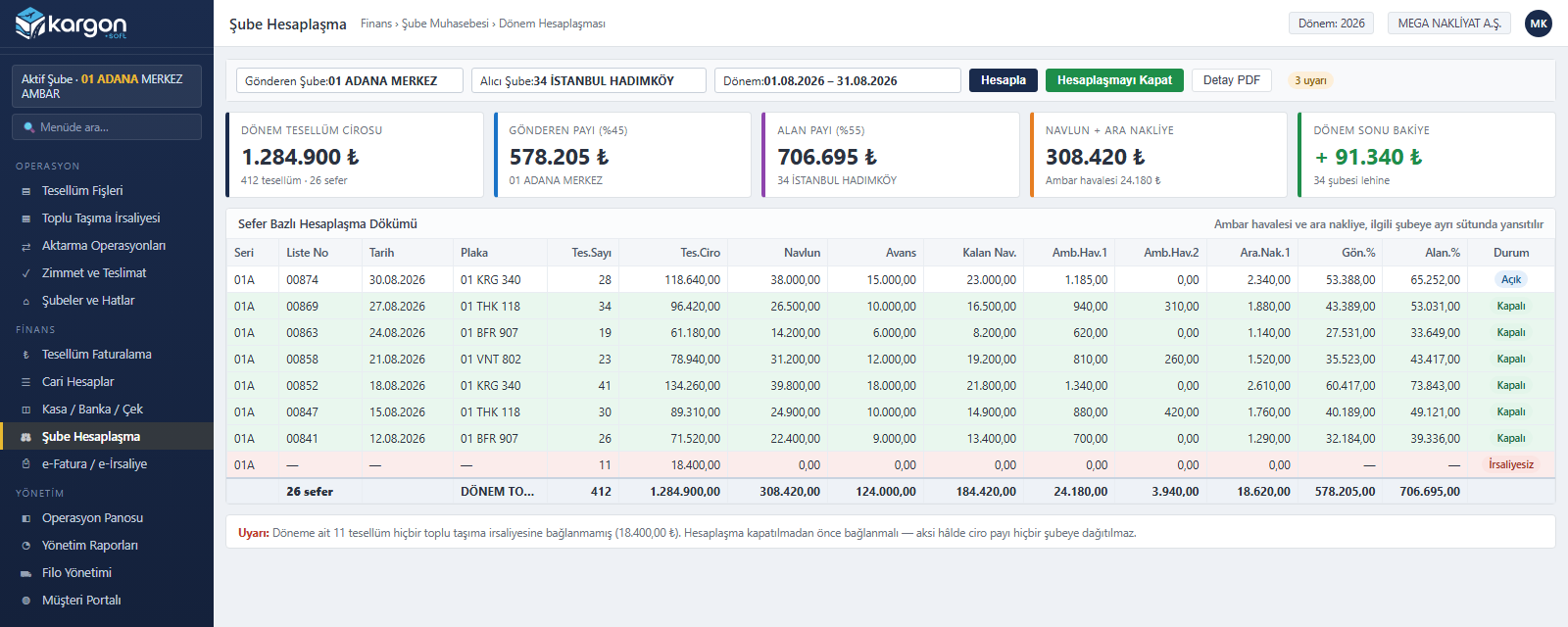
A branch pair and a period are selected, and the system pulls every trip in that period. Consignment revenue, freight charge, advance, balance, inter-branch freight transfer fee and intermediate haulage sit in separate columns; each branch's share is calculated automatically from its agreed percentage. Consignments not linked to any waybill are flagged as a warning, and the period cannot be closed until they are.
Consignment-Based Invoicing and e-Invoice
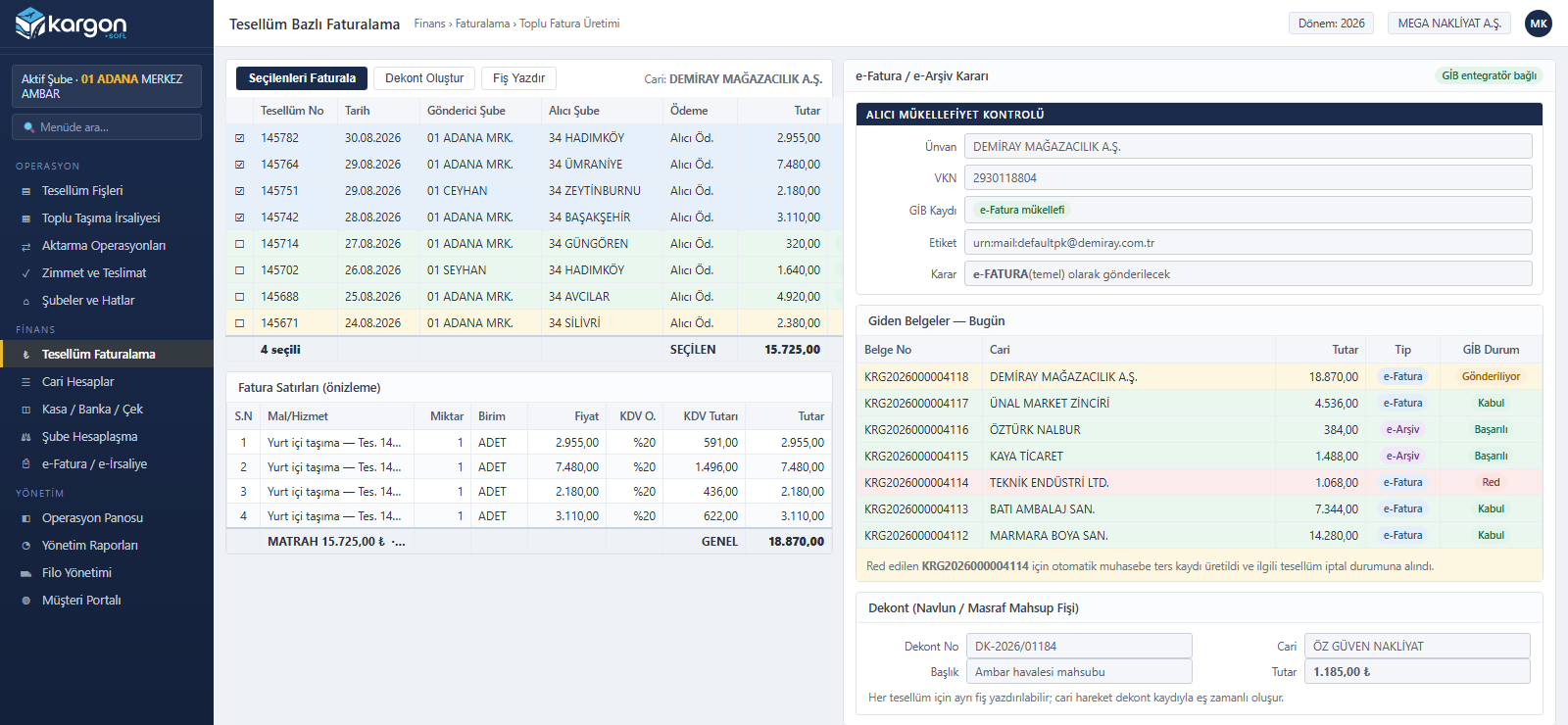
Uninvoiced consignments belonging to an account are selected and turned into a draft invoice in one action; each consignment becomes its own line with its own number. The buyer's tax number is matched against the Turkish Revenue Administration (GİB) taxpayer list, so the e-Invoice or e-Archive decision is made automatically. On a rejected document, the reversing accounting entry and consignment cancellation run by themselves.
Current Account and Payable/Receivable Tracking
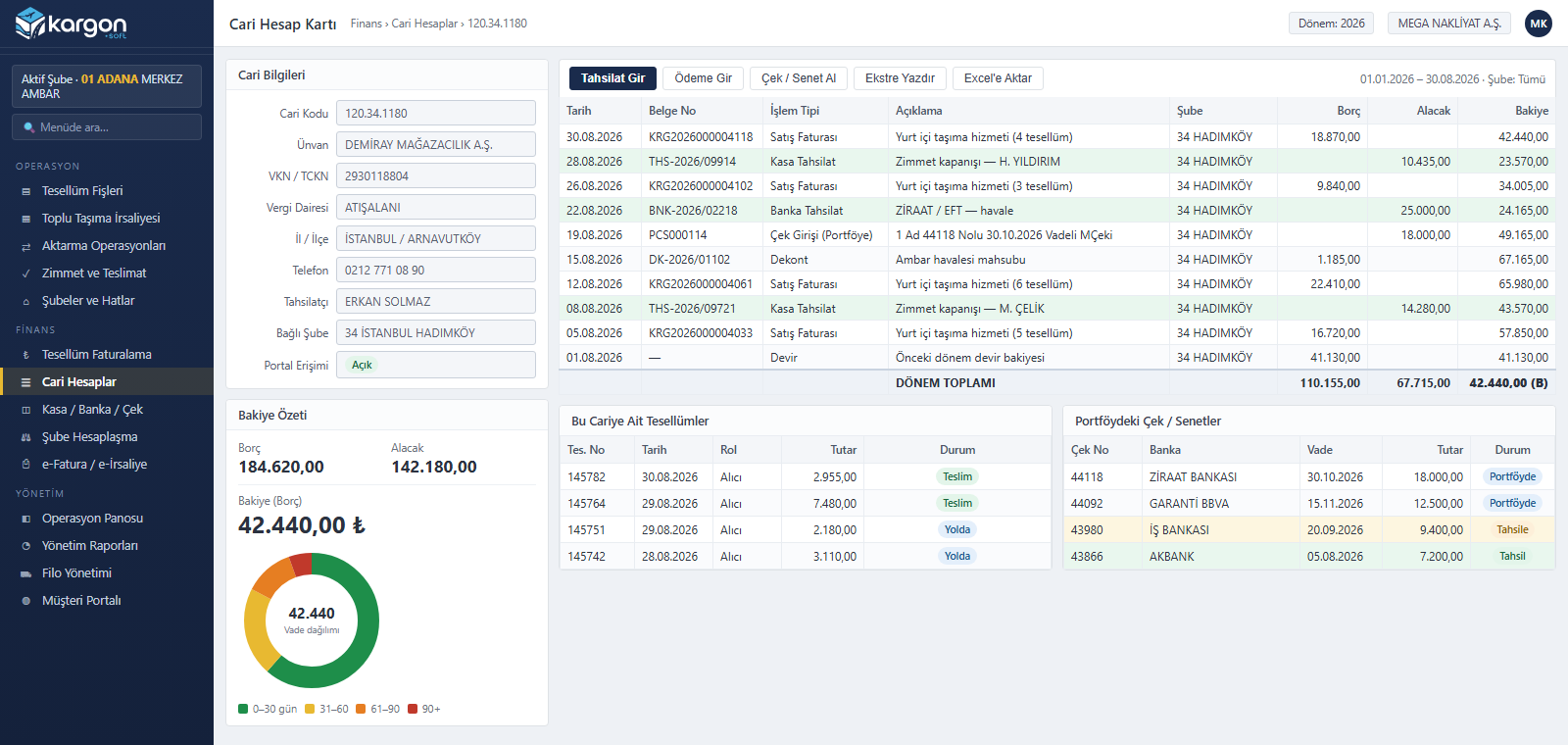
Sales invoices, cash and bank collections, debit notes and cheque movements are listed in a single statement together with branch information. The balance summary and maturity breakdown sit at the top of the card; the account's consignments and the cheques in portfolio are on the same screen. When a customer asks which shipments an invoice came from, the answer is one click away.
Daily Operations Dashboard
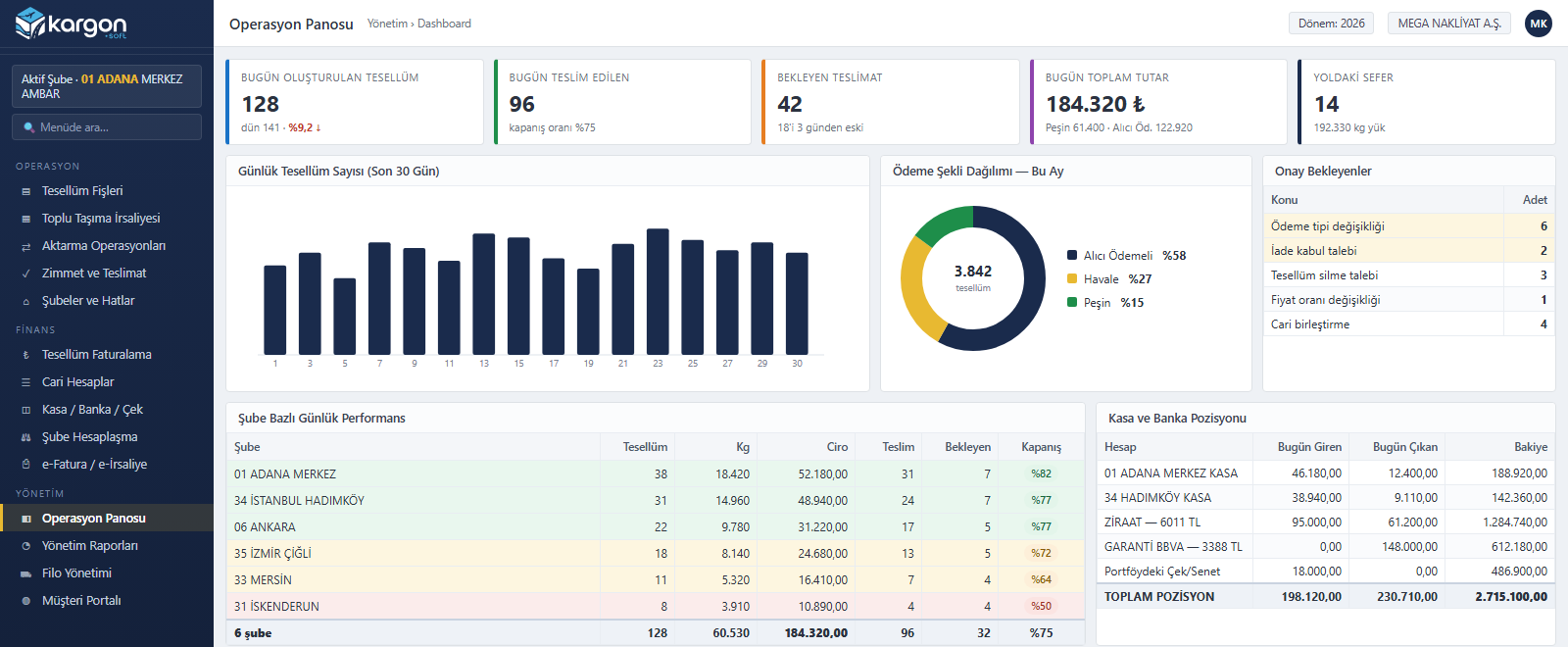
Consignments created, delivered and pending today, the day's revenue and the number of trips on the road appear on the first screen. The last thirty days of consignment volume, the payment-method split and a branch-level performance table are on the same page. Pending approvals and the cash, bank and cheque position are summarised in separate boxes.
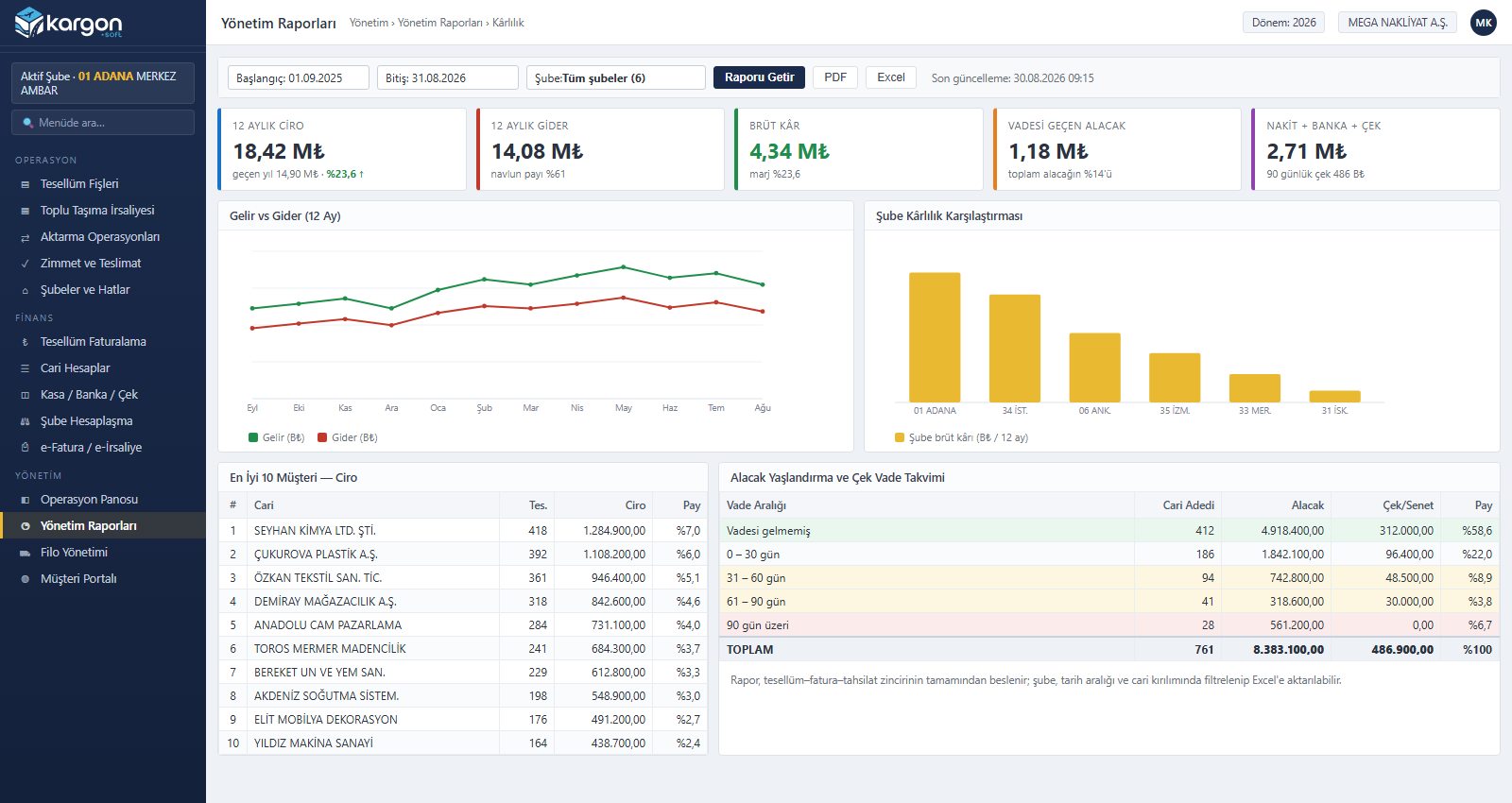
Management Reports and Profitability Analysis
A twelve-month income and expense trend, gross margin, branch profitability comparison, top customers and receivables ageing are gathered in one panel. Reports are fed by the consignment–invoice–collection chain and need no separate data entry; all of them filter by branch and date range and export to PDF or Excel.
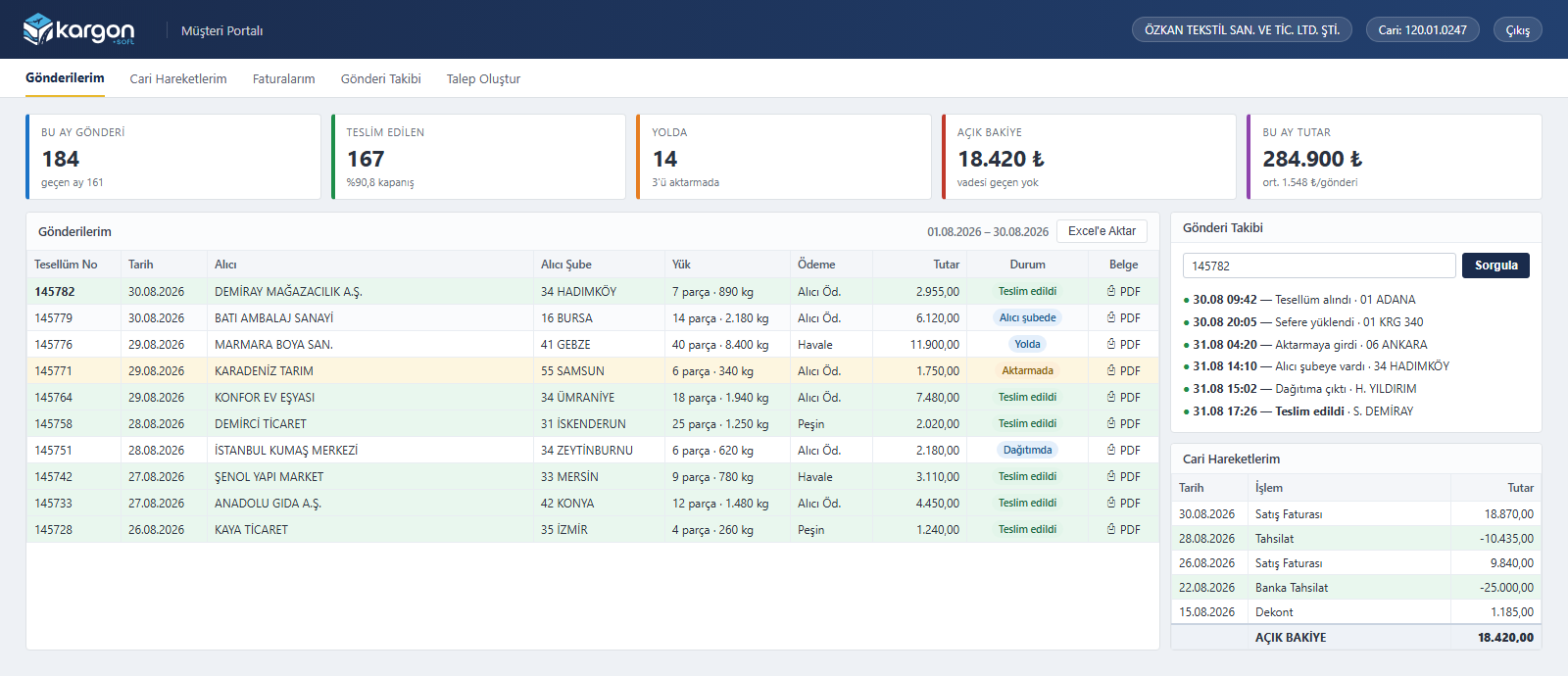
Customer and B2B Portal
Customers sign in with their own account through a separate link, independent of the internal permission system, with no ERP user to create. They see their own shipments, cargo details, amounts and current status, and download documents as PDF. Shipment tracking is listed step by step from consignment to delivery; the open balance and account movements are on the same screen.
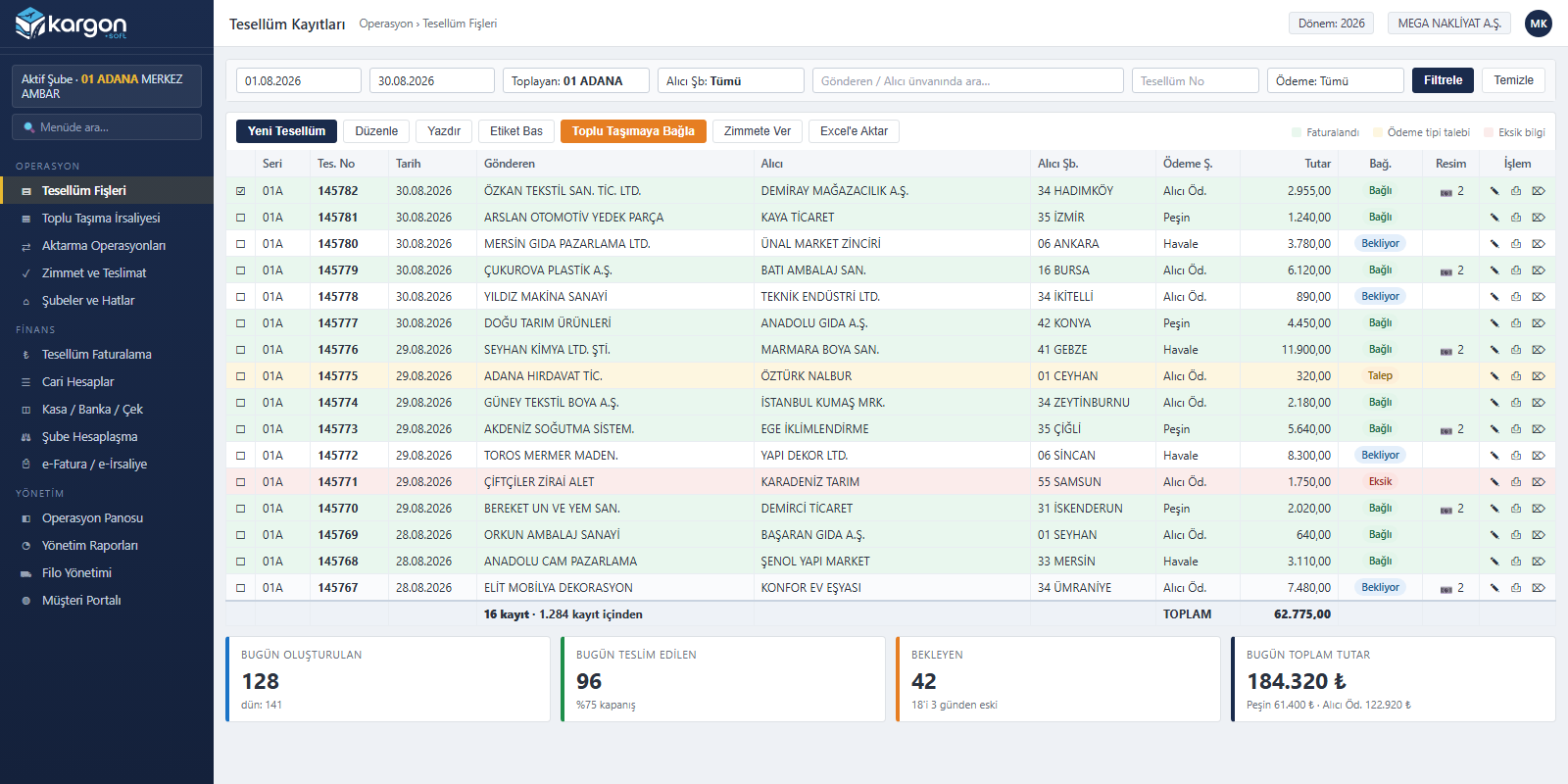
Consignment Records and Daily Tracking
Filtered by date range, branch, payment method and account title, the list brings the entire day onto one screen. Invoiced records show green, those awaiting a payment-type change yellow, and incomplete ones red. Selected records are linked to a waybill, assigned for delivery or invoiced in a single action; daily totals appear along the bottom.
Depot operations
A shipment's journey through the branch network
A shipment is accepted at the origin branch, passes through a transfer hub and is delivered at the destination branch. Kargon™ shows which branch each shipment is at and who will collect payment; status history is recorded at every step.
-
Origin branch
Consignment acceptance slip: sender / receiver accounts, line items, payment type.
-
Consolidated waybill
Loading onto the linehaul vehicle; intra-city and intercity consolidated transport waybills.
-
Transfer hub
Intermediate haulage; tracking of loads waiting at the hub and dwell time.
-
Destination branch
Courier assignment, delivery and receiver-pays collection.
-
Inter-branch settlement
Revenue share, advance / remaining freight, depot transfer fee.
How Kargon™ handles LTL transport
| Topic | How Kargon™ handles it |
|---|---|
| Shipment record | Sender / receiver accounts, 5 separate branch roles, route, line items (quantity, unit, kg, m³, volumetric weight, barcode) |
| Payment type | Prepaid (sender), receiver-pays, split between sender and receiver; sender and receiver sides invoiced separately |
| Additional charges | 2 tiers of intermediate haulage, 2 tiers of depot transfer fees (% or amount); forklift, handling, cargo handling |
| Pricing policy | Contracted / free-of-charge flags; increase rates by branch, period and customer |
| Consolidation | Intra-city and intercity consolidated transport waybills |
| Delivery | Courier assignment list (PDF), delivery status |
| Documents | Debit/credit notes (DKN series), scanned images, pre-printed slip printing on dot-matrix printers |
| Invoicing | A single invoice from selected shipments; automatic e-Invoice / e-Archive selection |
| Inter-branch settlement | Earnings share percentage and signed balance by period and branch pair; warning for partially linked waybills |
| Approval | Payment type changes require approval from the origin branch |
Modules
All Modules on One Screen
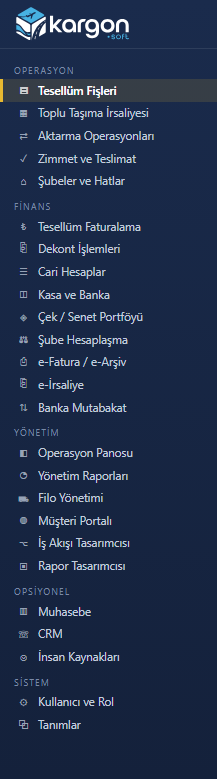
Kargon is not a single module but a platform covering the whole depot operation: consignments and dispatch, bulk transport waybills and linking, transfer hubs, delivery assignment, inter-branch settlement, current accounts, cash, bank and cheques, consignment-based invoicing, e-Invoice, fleet, workflow, the customer portal and management reports. Accounting, CRM and Human Resources modules are optional.
Other Kargon™ solutions
Full Truckload (FTL) and Tonnage
Full truckload and tonnage transport — Trips, freight, subcontractors and fleet cost
International
International transport — Export, import, transit; customs, CMR and foreign currency
Warehousing (WMS)
Warehousing and 3PL services — Goods receipt, addressing, consigned stock, billing
Free demo
See your operation running on Kargon
Let's walk through the modules and screens that fit your business model together in a short online meeting.