
Full Truckload (FTL) and Tonnage · Full truckload and tonnage transport
See the real profit on every FTL and tonnage trip
Freight and all trip expenses are calculated as you type; net contribution is visible before the record is even saved. Fuel, maintenance and vehicle costs are linked to the relevant trip; the dispatch waybill, subcontractor cost and account are fed from the same record.
Instant net contribution
The operation slip calculates freight and expenses before the record is even saved.
True profitability
Revenue, expenses and margin per customer and per trip, side by side.
Fleet control
Inspection, insurance and casco due dates stand out with color-coded alerts.
Subcontractor scorecard
Your carriers are measured by trips, earnings and on-time delivery rate.
Who is it for?
For companies hauling full truckloads and tonnage
Built for full truckload (FTL) carriers, fleet owners and warehouse operations. Orders, transport plans, trips, fleet, current accounts and cost tracking come together on a single platform, so operations and accounting move on the same data.
What do you get?
- Operation and trip entry on one screen
- Freight priced in tons, kg, pallets or big bags
- Dispatch waybill and e-Waybill
- Fleet, fuel and vehicle document tracking
Product tour
Meet the Full Truckload (FTL) and Tonnage screens
The screens below walk through a real workflow step by step. Click any image to enlarge it.
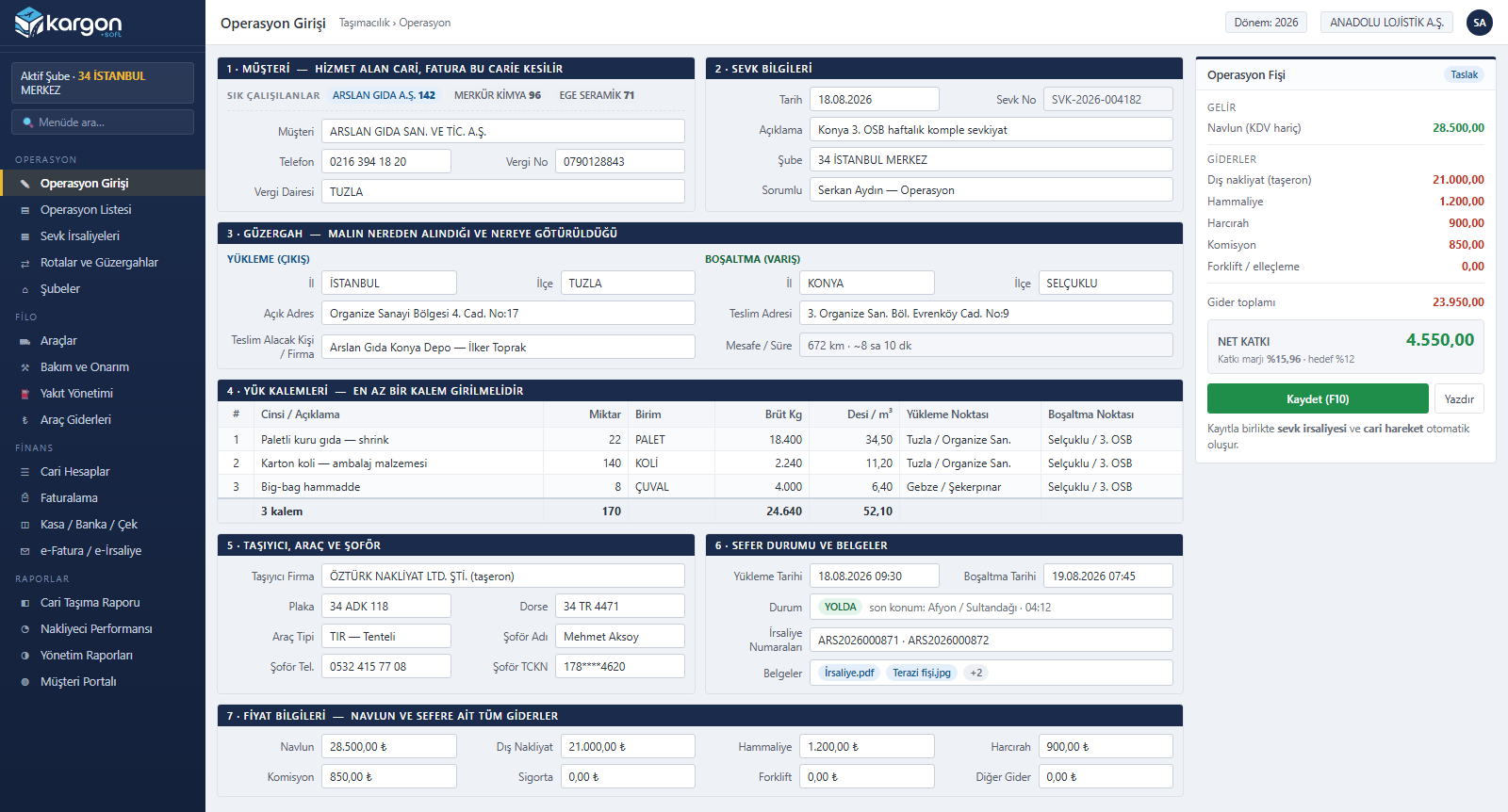
Complete Trip Entry on a Single Screen
On the Kargon™ operation entry screen, customer, route, cargo lines, carrier, vehicle and driver details are captured in one form, and the trip record and waybill are created together. The live operation slip on the right calculates freight revenue and every trip cost instantly, showing net contribution before the record is even saved.
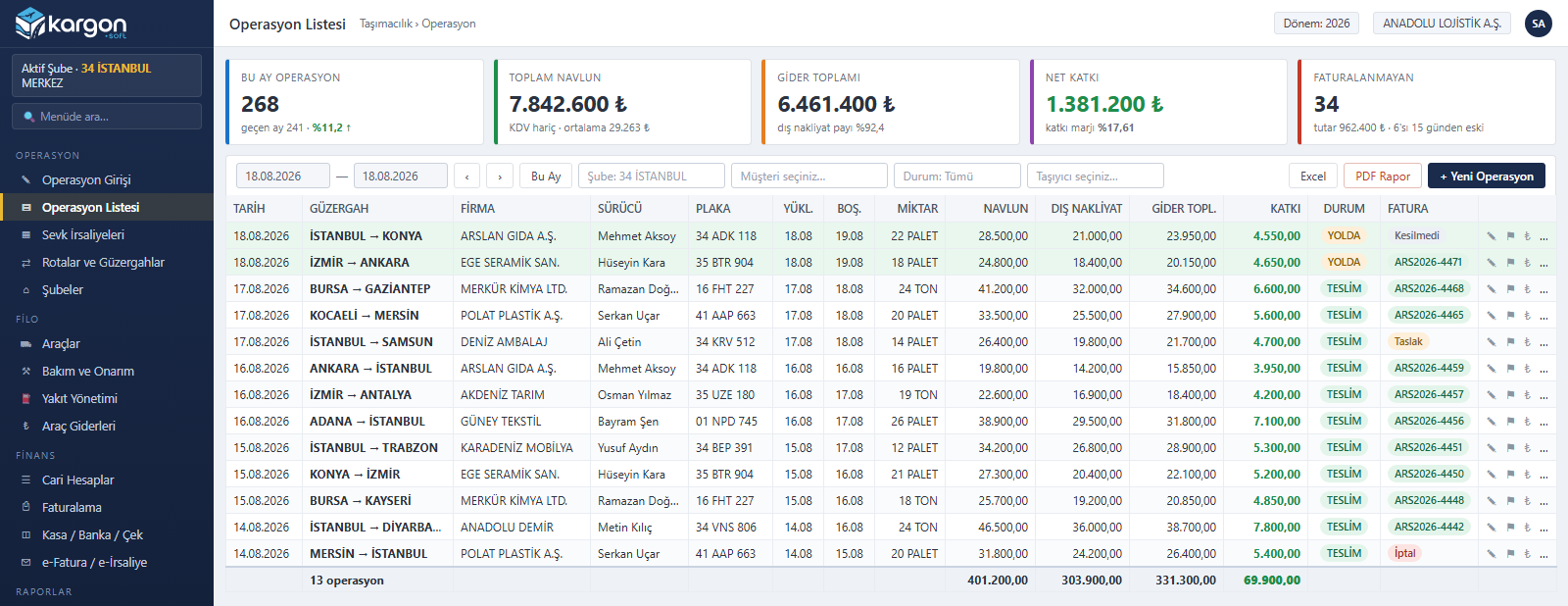
Trip List with Per-Trip Profitability
The Kargon™ operation list shows every trip in one table with its date, route, customer, plate, driver and invoice status. Alongside freight revenue, subcontracted haulage and total cost, the net contribution of each trip appears on its own row, while filters and bulk actions make uninvoiced trips quick to find and close.
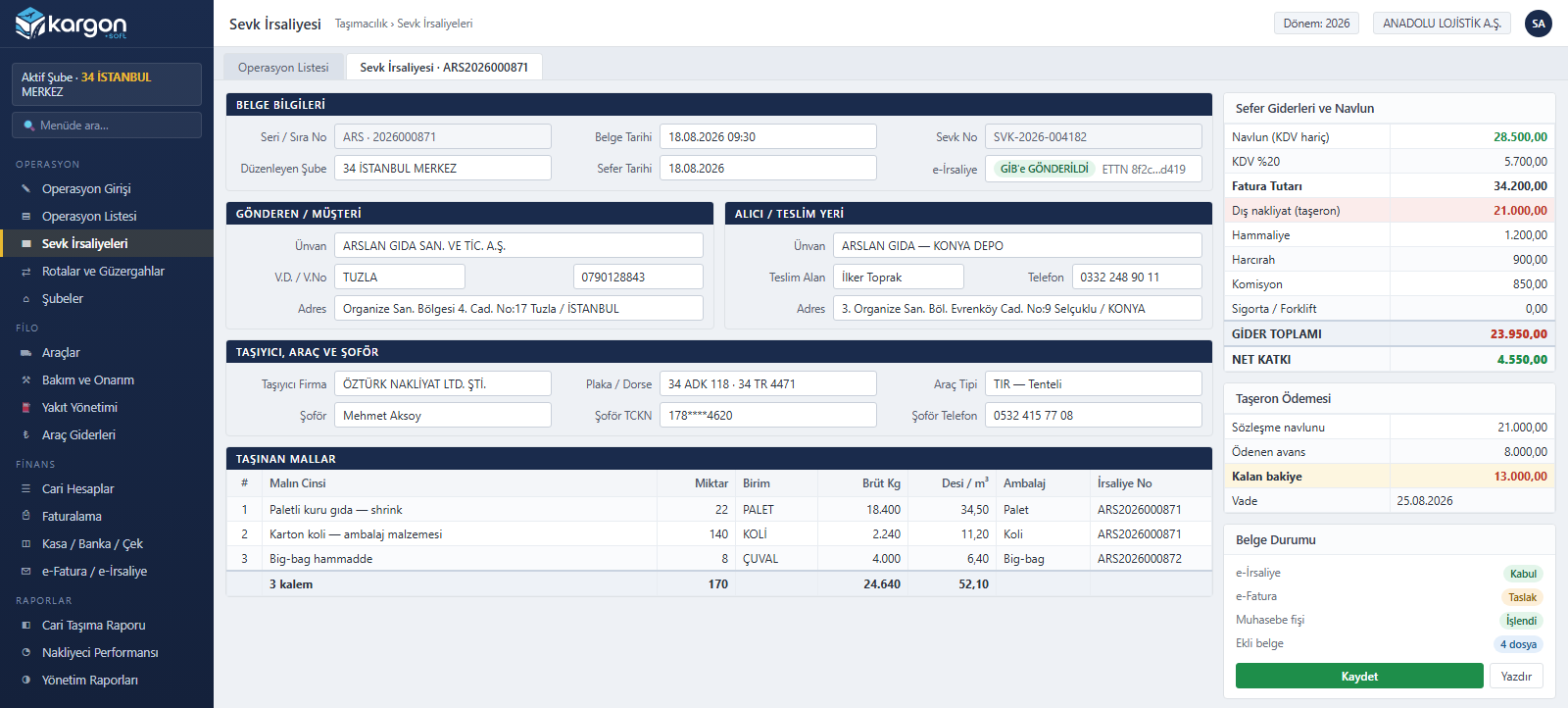
Waybills and e-Waybill Management
The Kargon™ waybill screen brings document details, consignor and consignee accounts, carrier, vehicle and driver data and the goods carried onto a single page. Freight revenue, trip costs and the subcontractor's payable are tracked from the same screen; the e-waybill is filed with the tax authority and the ledger entry is created automatically.
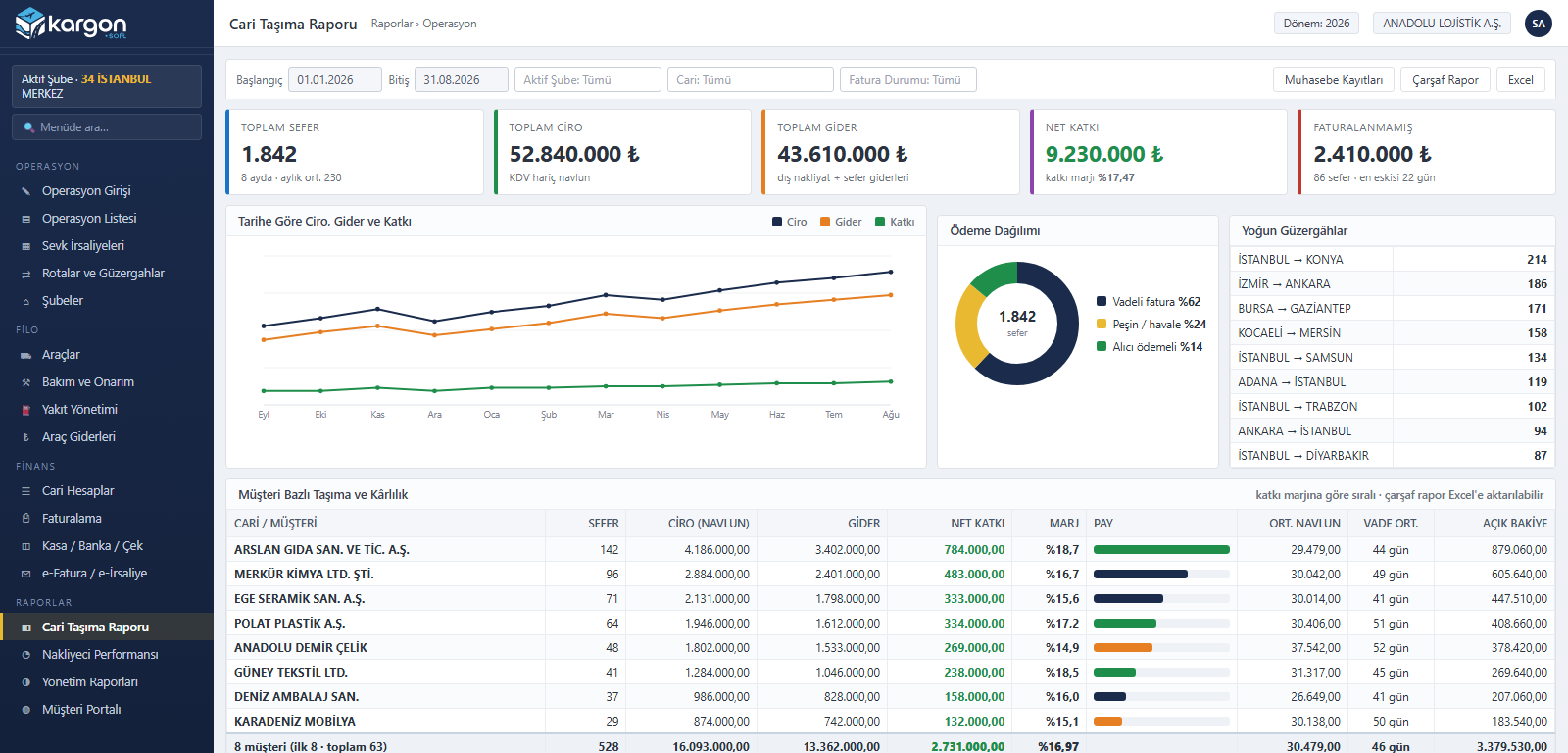
Customer Transport and Profitability Report
The Kargon™ customer transport report lays each customer's trip count, revenue, cost and net contribution side by side. Revenue-cost-contribution trends over time, the busiest lanes and the payment mix are shown as charts, so the margin column reveals which customers actually earn money — independently of who ranks highest on revenue.
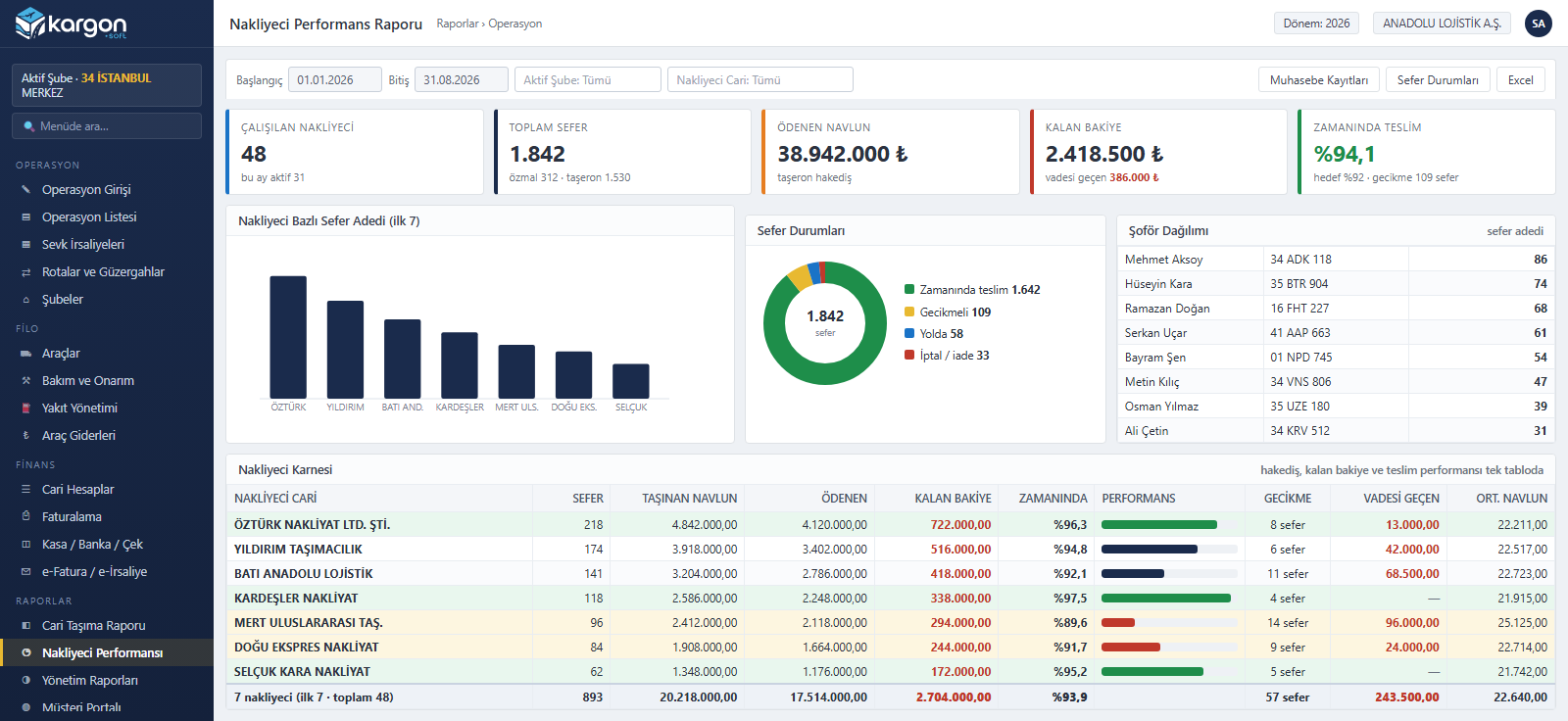
Carrier Performance and Payable Tracking
The Kargon™ carrier performance report scores every subcontractor and owner-operator you work with on trip count, freight carried, amount paid and outstanding balance. On-time delivery rate, delay count and overdue balance sit in one table, so carrier selection and rate negotiation are backed by data rather than memory.
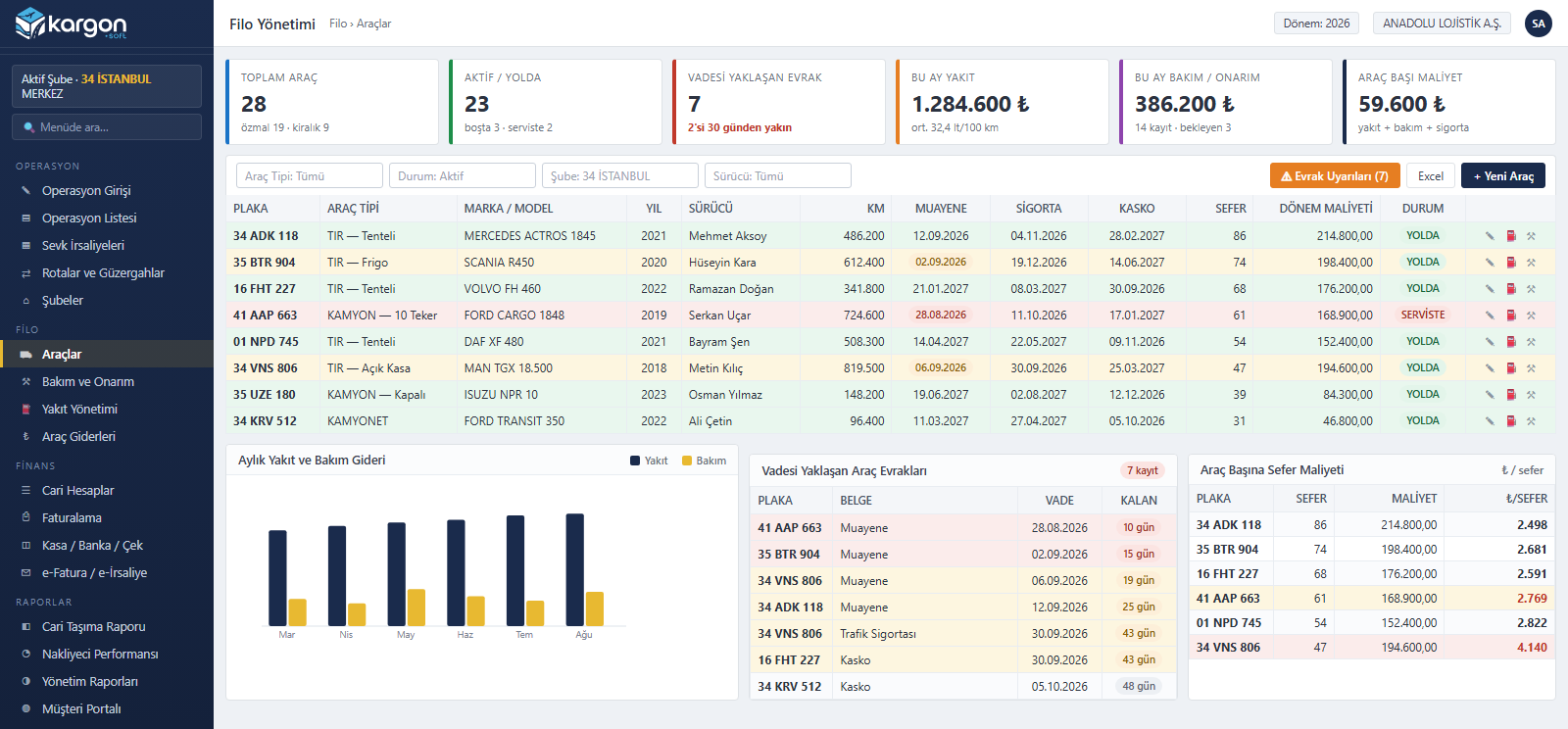
Fleet, Fuel and Vehicle Document Tracking
Kargon™ fleet management lists owned and rented vehicles with mileage, driver, trip count and period cost. Inspection, traffic insurance and comprehensive cover expiry dates are surfaced as colour-coded warnings, while fuel and maintenance spend is converted into a cost-per-trip figure that exposes the vehicles losing money.
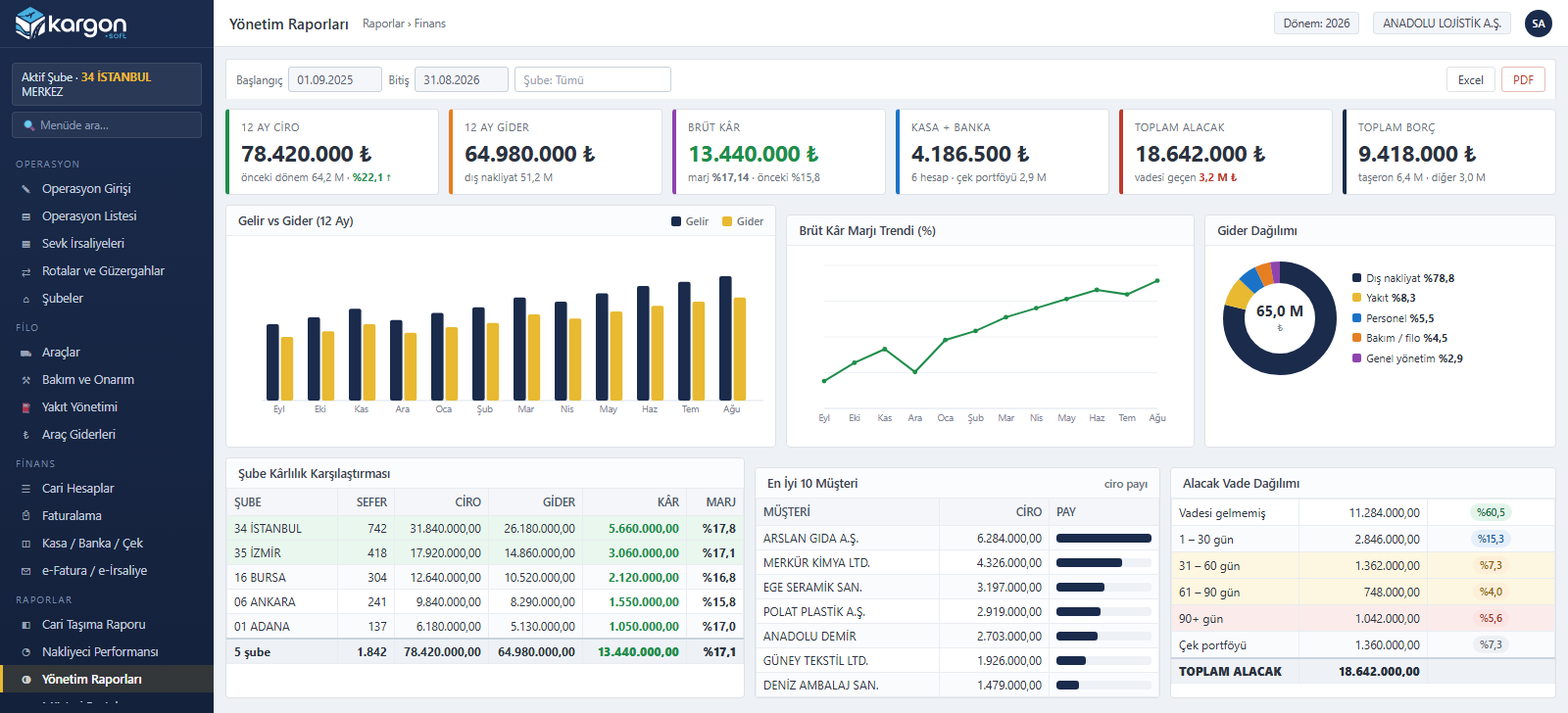
Management Reports and Financial Dashboard
Kargon™ management reports gather twelve months of revenue and cost, the gross margin trend and the expense breakdown into one panel. Branch profitability is compared, top-earning customers are ranked, and receivables are aged into maturity bands so collection risk becomes visible before it turns into a delay.
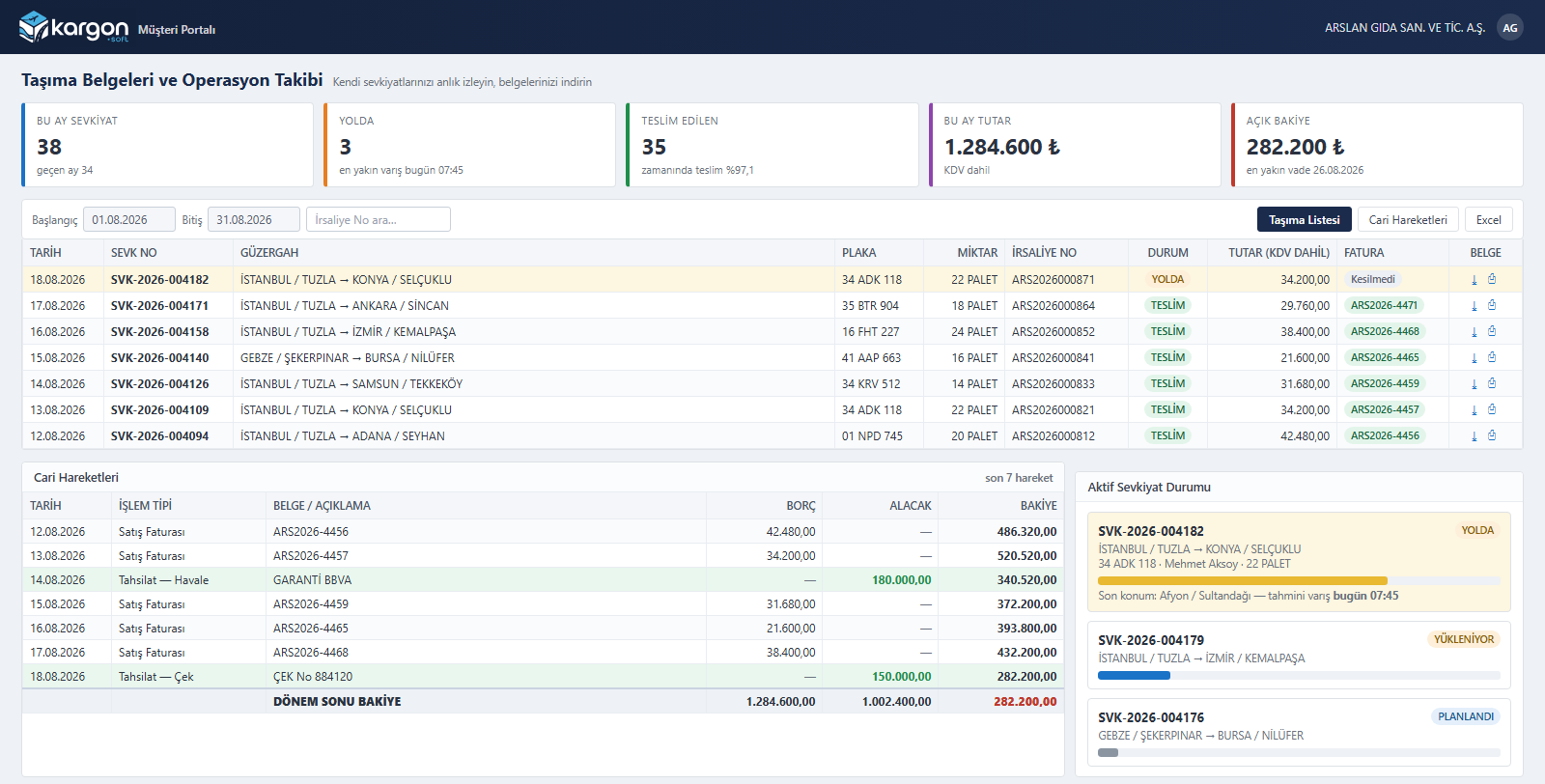
A Self-Service Portal for Your Customers
The Kargon™ customer portal lets your customers follow their own shipments by trip number, route, plate and delivery status. Waybills and invoices are downloaded straight from the portal and account movements with the open balance are visible at any moment, which noticeably cuts the “where is my load” calls reaching your operations team.
Transport models
Full truckload and tonnage transport
Industrial customers hiring full trucks and bulk / tonnage hauls on the same operation screen; with owned, subcontracted or one-off hired vehicles.
Full · FTL
Full truckload transport
- Single-screen operation entry: shipment record and waybill are created together
- Choice of owned vehicle, subcontracted carrier or one-off hired vehicle
- Two separate loading points, full address and consignee contact
- Driver change en route (previous driver, time, note)
- Departure / arrival km, loading, unloading and estimated delivery dates
- Real-time net contribution from freight, subcontractor cost and trip expenses
Tonnage
Tonnage and bulk transport
- Gross kg and m³ on cargo lines; total trip weight summed automatically
- Pricing with configurable units such as ton, kg, pallet, big bag and piece: freight = quantity × unit price
- Load planning against the vehicle card's carrying capacity (kg / m³)
- Weighbridge / scale ticket attached to the trip as a document
- Batch-based shipments with multiple waybill numbers
- Customer-specific price increase rates (by period and branch)
Process
Shipment lifecycle
Status history is kept separately for both the shipment and the waybill; operations, accounting and management all see the same record.
-
Request
Customer, route, cargo details; frequently used accounts in one click.
-
Planning
Owned, subcontracted or hired vehicle; driver, trailer, document checks.
-
Loading
Shipment record + waybill; multiple waybill numbers, document attachments.
-
In transit
Status history, driver changes, km and delay alerts.
-
Delivery
Delivery dates, scanned documents, customer portal.
-
Invoice
Per-shipment batch invoicing; e-Invoice / e-Archive.
-
Collection
Account transactions, bank matching, accounting voucher.
Trip cost is calculated, not estimated
Fuel, maintenance and vehicle expenses are automatically linked to the relevant trip using date and km tolerances (from 1 day before loading to delivery, ±50 km). Net contribution = freight − expenses − external haulage − vehicle cost.
Modules
All Modules on One Screen
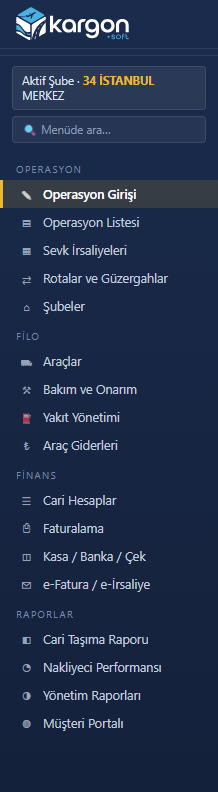
Kargon™ unites operation entry, waybills, route and branch management, fleet (vehicles, fuel, maintenance, vehicle costs), customer accounts, invoicing, cash-bank-cheque, e-invoicing and management reporting on a single platform. Operations, accounting and management work on the same data, so a trip entered once flows into documents and the ledger on its own.
Other Kargon™ solutions
LTL and Depot Networks
Partial loads (LTL) and branch networks — Consignment acceptance, transfer hubs, courier assignment and inter-branch settlement
International
International transport — Export, import, transit; customs, CMR and foreign currency
Warehousing (WMS)
Warehousing and 3PL services — Goods receipt, addressing, consigned stock, billing
Free demo
See your operation running on Kargon
Let's walk through the modules and screens that fit your business model together in a short online meeting.