
Module 09 · Freight Forwarding
Freight Forwarding
For freight forwarders: house job and master consol structure, container and milestone tracking, HBL / HAWB and other documents, job profitability from revenue and cost lines, freight quotes, multi-currency invoicing and agent reconciliation. Road legs link to shipment operations, CFS and bonded warehouse work to the warehouse module.
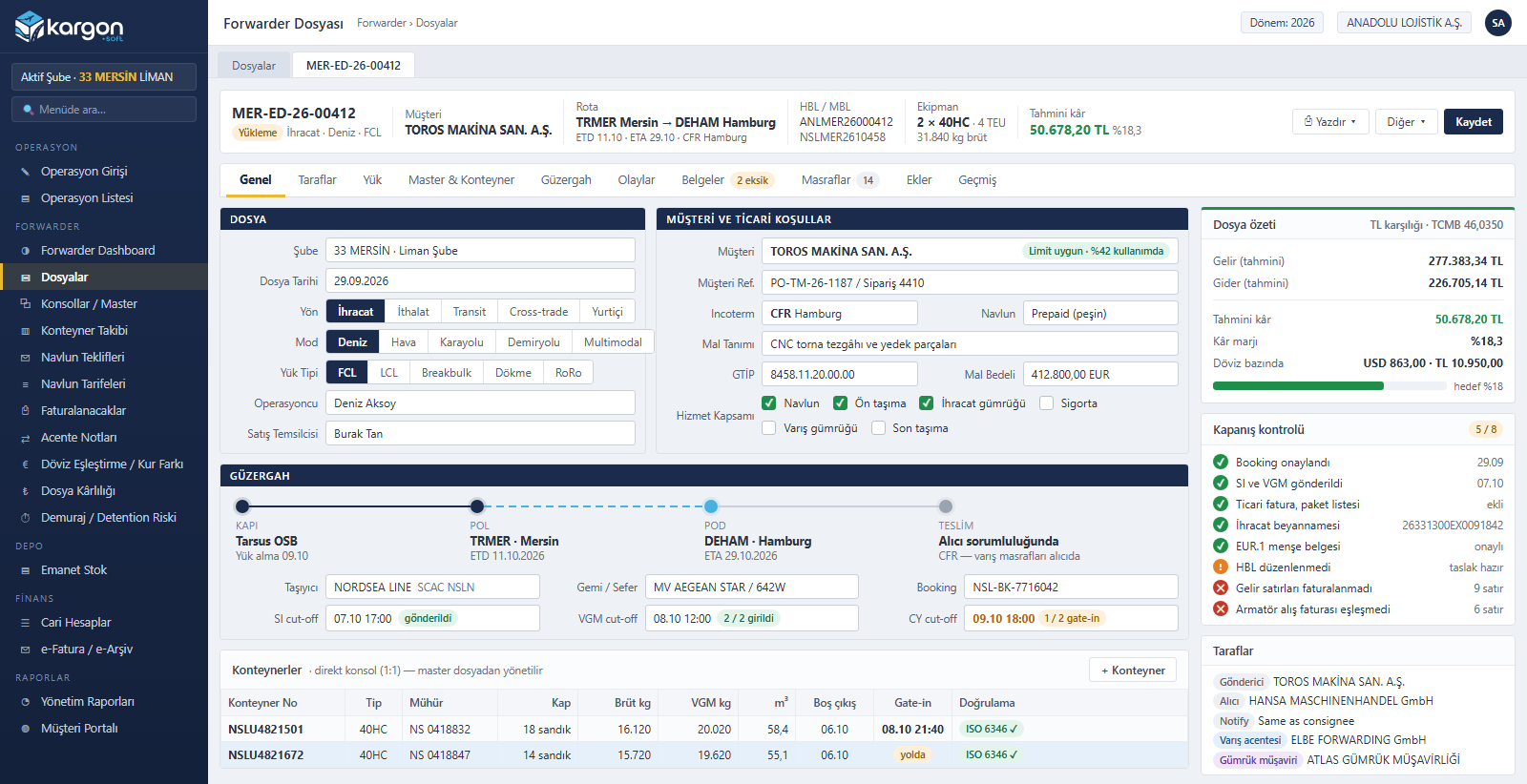
transport modes: sea, air, road, rail, multimodal
directions: export, import, transit, cross-trade, domestic
print-outs: HBL, HAWB, arrival notice, booking confirmation, SI, manifest, job sheet
job statuses: from draft to booking, in transit, arrived, delivered and closed
Module scope
What's in the Freight Forwarding module?
- Job (house) and consol (master)
- Sea FCL / LCL, air, road, rail
- Container, milestone and document tracking
- Revenue and cost lines, job profit
- Freight rates and quotes
- FX invoicing, agent notes, exchange differences
Core
Jobs, consols and cargo
Every transport service sold to a customer is a job; the master bought from the carrier is kept on the consol. Everything from parties to attachments lives in a single record.
Forwarding job (house)
- Direction, mode, load type, Incoterm, freight terms
- Parties: shipper, consignee, notify, agents, customs broker
- Job number per branch and year; copy, branch transfer
- Status flow and closing checklist
Consol (master)
- MBL / MAWB, booking, vessel and voyage or flight
- Direct (1:1) and consolidation
- Mode, direction and POL / POD checks on membership
- Consol milestones flow to member jobs
Cargo and measurements
- Package lines: HS code, package type, dimensions, kg, m³
- Automatic CBM, W/M (revenue ton), chargeable kg, LDM
- Tonnage: declared, loaded and discharged weight, loss
- Dangerous goods and temperature-controlled cargo
Containers and equipment
- Container numbers with ISO 6346 check digit
- Type, seal, VGM, empty pick-up, gate-in, return
- Container share per job for LCL
- AWB stock: next MAWB, mod 7 validation
Milestones and documents
- Milestone templates by mode and direction (booking, departure, arrival, delivery…)
- Actual milestones move the job status forward
- Document requirement checklist; HBL from draft to release
- Attachments on the job; customer-visible milestones in the portal
Routing and operations
- Pre-carriage, main and on-carriage legs
- One-click shipment operation from a road leg
- Trip cost becomes a cost line on the job automatically
- The linked operation is not invoiced separately
Profitability
The charge line engine
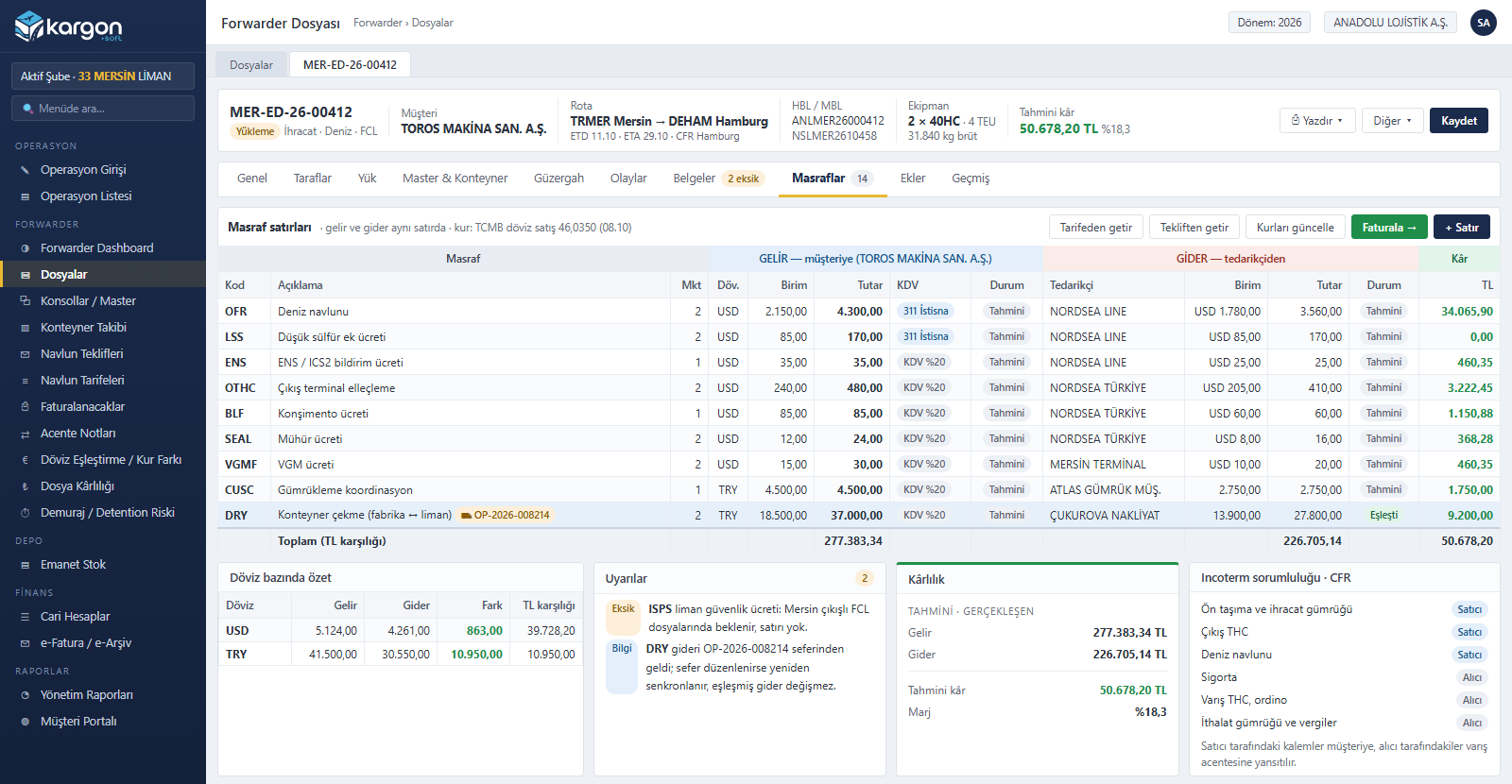
The heart of the module: every line carries both the revenue (to the customer) and the cost (from the supplier) side. Invoiced revenue and matched costs are locked; buy rates and profit are visible only to authorised users.
| Topic | How it works |
|---|---|
| Charge codes | Freight, surcharges (BAF, LSS…), origin and destination local charges (THC, B/L fee, ISPS…), road, customs, storage, insurance and pass-through items come ready-made |
| Charge basis | Job, container, TEU, kg, chargeable kg, W/M, tonne, m³, LDM, pallet, package, day or percentage; quantity taken from the job |
| Currency and rate | Currency per line; the day's TCMB rate, overnight updates on open jobs, manual rates only with permission |
| VAT regime | Exemption for international transport, 20% for domestic services, pass-through for payments on the customer's behalf; changes are logged |
| Profitability | Estimated and actual profit per currency and in TRY; missing-charge warnings, Incoterm responsibility |
| Consol cost | Consol costs are allocated to member jobs by W/M, m³, kg or equally, and can be reversed |
Revenue and cost on the same line
The invoiced revenue side and the matched cost side are locked; road haulage cost from operations is written automatically. Profit, margin and the difference per currency are always visible on the job summary.
- Pull lines from rates or quotes
- Operation cost synchronised automatically
- Missing-charge and VAT regime warnings
- Seller / buyer responsibility by Incoterm
Finance
Multi-currency invoicing and reconciliation
Billing queue
Revenue lines are grouped by account, currency and VAT regime; foreign-currency e-Invoice drafts are created with the exchange rate.
Disbursement notes
Payments made on the customer's behalf, such as customs duty, import VAT and port charges, are passed through without an invoice.
Agent notes
English debit / credit notes for overseas agents; agent profit share calculation.
Purchase matching
Shipping line and airline invoices are matched to cost lines from incoming e-Invoices or foreign purchase documents.
FX differences and revaluation
Foreign-currency receipts and payments are matched FIFO; realised exchange differences and period-end revaluation become journal entries.
Credit limit
Warning when a job is opened; HBL / HAWB release is blocked over the limit unless overridden by permission.
Sales and tracking
Quotes, tracking and customer communication
Freight rates
Carrier buy rates by route, equipment and validity; import from Excel.
Quotes
Quotes with revisions, margin rules, Turkish / English PDF and e-mail; one click to a job once accepted. Linked to CRM leads.
Demurrage / detention
Tiered free-time rules, overnight calculation, a risk list and cost lines written to the job.
Notifications and reminders
Automatic e-mails to the customer on ETA change and arrival; reminders for cut-offs, VGM, documents and free time.
Customer portal
Customers see their own jobs, milestones and foreign-currency balance and request quotes from the portal.
Reports
Job profitability, volume, unbilled revenue, unmatched costs, foreign-currency balances, WIP accrual, quote conversion.
All the screens
The forwarding dashboard, job, charge lines, consol, routing and milestones, freight quote, billing queue and demurrage risk screens are walked through in order on the Freight Forwarding solution page.
Other modules
Shipments and Operations
LTL, full truckload (FTL), tonnage and international transport; from order to delivery and invoice in a single flow.
Fleet Management
Cost, documents and efficiency of owned and leased vehicles; by trip, by kilometer and by day.
Warehouse Management (WMS)
Compliant records for third-party warehousing, customer-owned consigned stock and monthly warehouse billing.
Accounting
Turkish Uniform Chart of Accounts, template-based automatic vouchers and accounting tied to operations.
Finance and Treasury
Current accounts, cash, bank, cheques/promissory notes, per-shipment invoicing and inter-branch settlement.
e-Documents and Integrations
GİB e-Invoice, e-Archive, e-Waybill; banks, CBRT, handheld terminals, printers and scanners.
HR, Payroll and CRM
Employee cards, leave and sick leave, payroll accrual and payment; lead and activity tracking.
Reporting and Customer Portal
Management (CEO) report, customer transport and carrier reports, report designer and customer tracking portal.
Security and Audit Trail
Role-based permissions, branch visibility, field masking, financial controls and a complete audit trail.
Free demo
See your operation running on Kargon
Let's walk through the modules and screens that fit your business model together in a short online meeting.