
Forwarder · Freight forwarding
Run every forwarding job from quote to close in one system
The Kargon™ Forwarding Module manages jobs, consols, containers, milestones and documents for sea (FCL, LCL, breakbulk, bulk, RoRo), air, road, rail and multimodal shipments, together with job profitability from revenue and cost lines, multi-currency invoicing and agent reconciliation — in the same database as your own fleet operations, warehouse and accounting.
House / master structure
Each customer shipment is a job; MBL / MAWB, vessel or flight and containers sit on the consol. Direct (1:1) or consolidated.
Profit per job
Every charge line carries both the sell and the buy side; estimated and actual profit per currency and in TRY.
Multi-currency billing
Foreign-currency e-Invoices, disbursement notes and agent debit / credit notes from one billing queue, with a VAT regime suggestion.
Road legs become operations
Pre- and on-carriage turn into a shipment operation in one click; the trip cost is written back to the job automatically.
Who is it for?
For forwarders and logistics companies that organise transport
A freight forwarder organises the movement of goods from one point to another, usually without owning the ship, aircraft or truck: it books space with carriers, issues the bill of lading, coordinates customs and port processes, manages the far end with an overseas agent and gives the customer a single invoice. Profit is made per job. The Kargon™ Forwarding Module runs this business on the same accounts, accounting and e-Invoice infrastructure for companies that also provide FTL, LTL, tonnage and warehousing services.
What do you get?
- Sea FCL / LCL, air, road, rail, multimodal
- Jobs, consols, containers, milestones and documents
- Revenue and cost lines with job profitability
- Multi-currency e-Invoice, agent notes, FX differences
Product tour
Meet the Forwarder screens
The screens below walk through a real workflow step by step. Click any image to enlarge it.
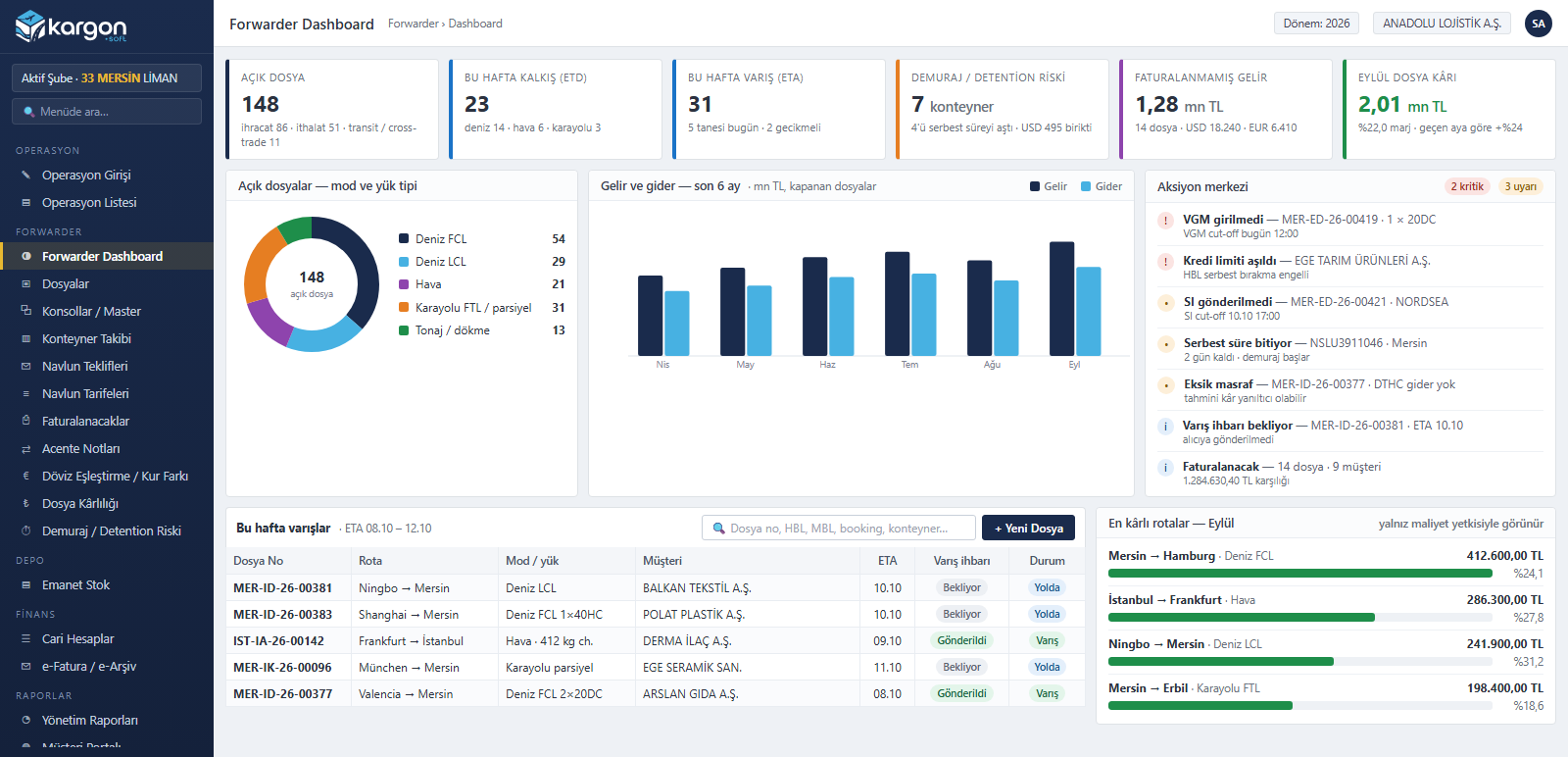
Forwarding Dashboard and Action Centre
Open jobs by mode and load type, this week's departures and arrivals, demurrage risk, unbilled revenue and monthly job profit on the first screen. The action centre lists VGM and SI cut-offs, credit limits, free time about to expire and missing charge lines by priority.
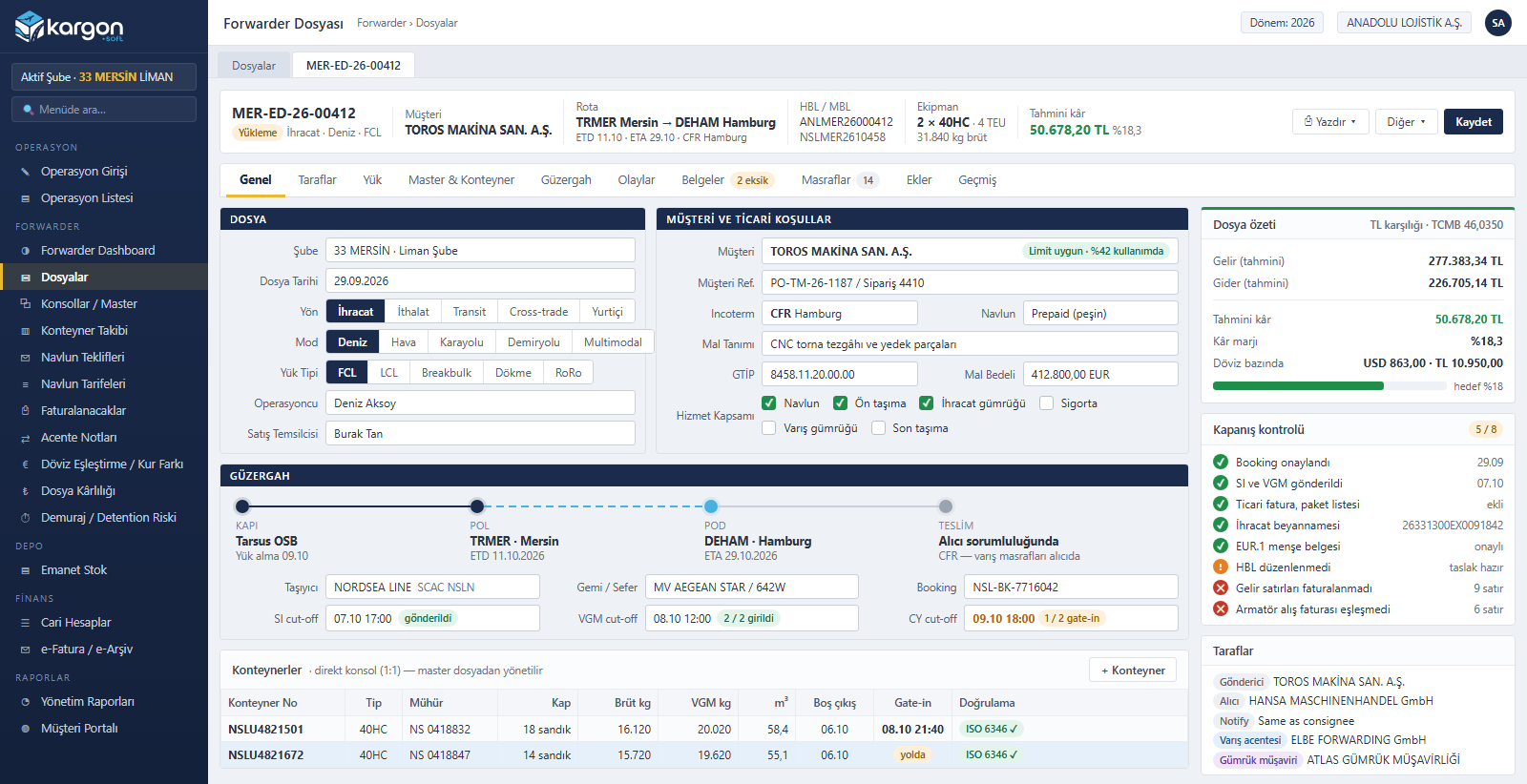
The Forwarding Job: Everything in One Record
Pick the direction (export, import, transit, cross-trade), mode and load type; enter the customer, Incoterm, freight terms and service scope. Routing, carrier, booking and cut-offs sit on the same tab, and container numbers are validated with the ISO 6346 check digit. The closing checklist shows what is still missing on the job.
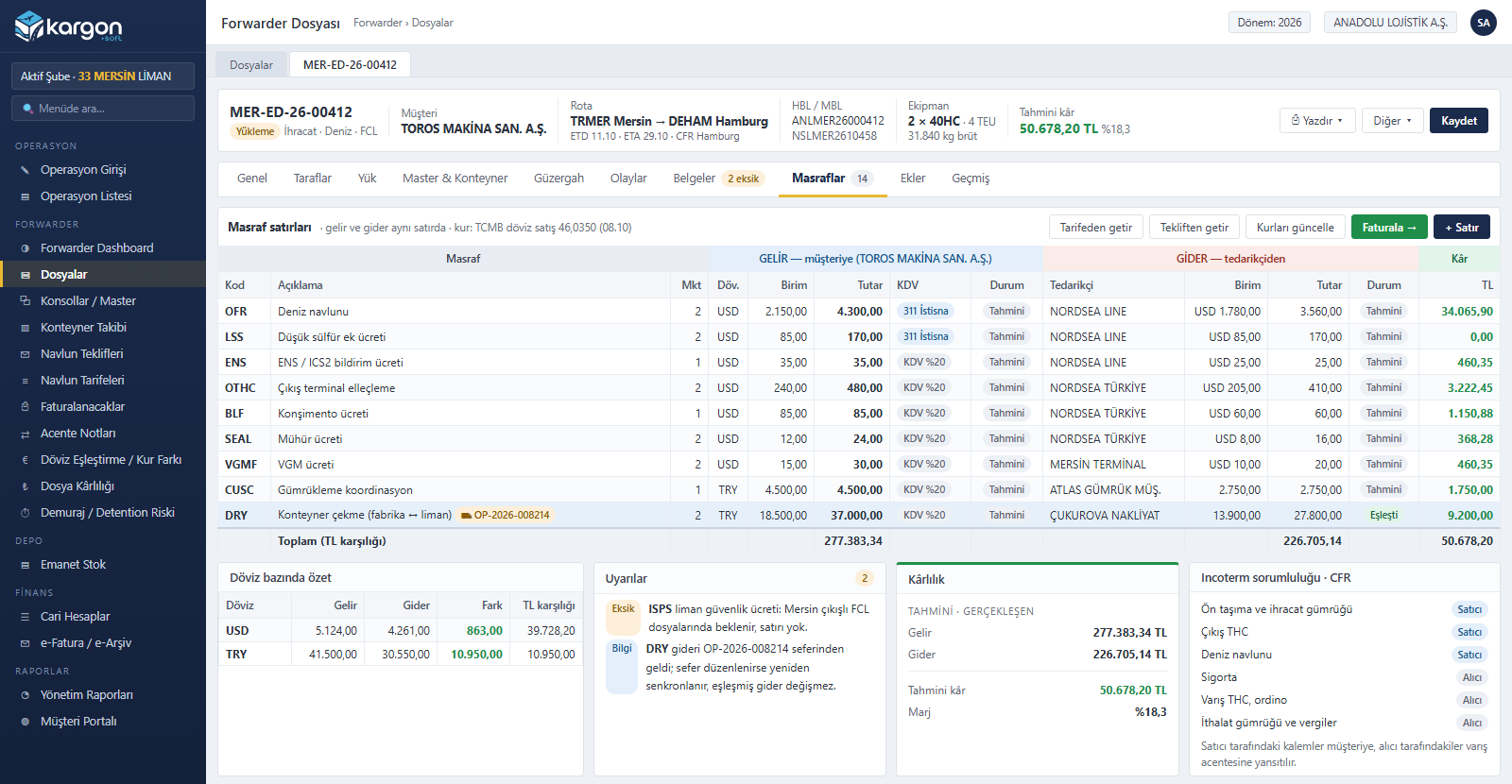
Revenue and Cost Lines, Job Profitability
Each charge code carries the sell side to the customer and the buy side from the supplier on a single line. Quantities come from equipment and measurements, exchange rates from the Central Bank of Türkiye (TCMB), and a VAT regime (exempt, 20%, pass-through) is suggested. Invoiced revenue and matched costs are locked; estimated and actual profit are tracked per currency.
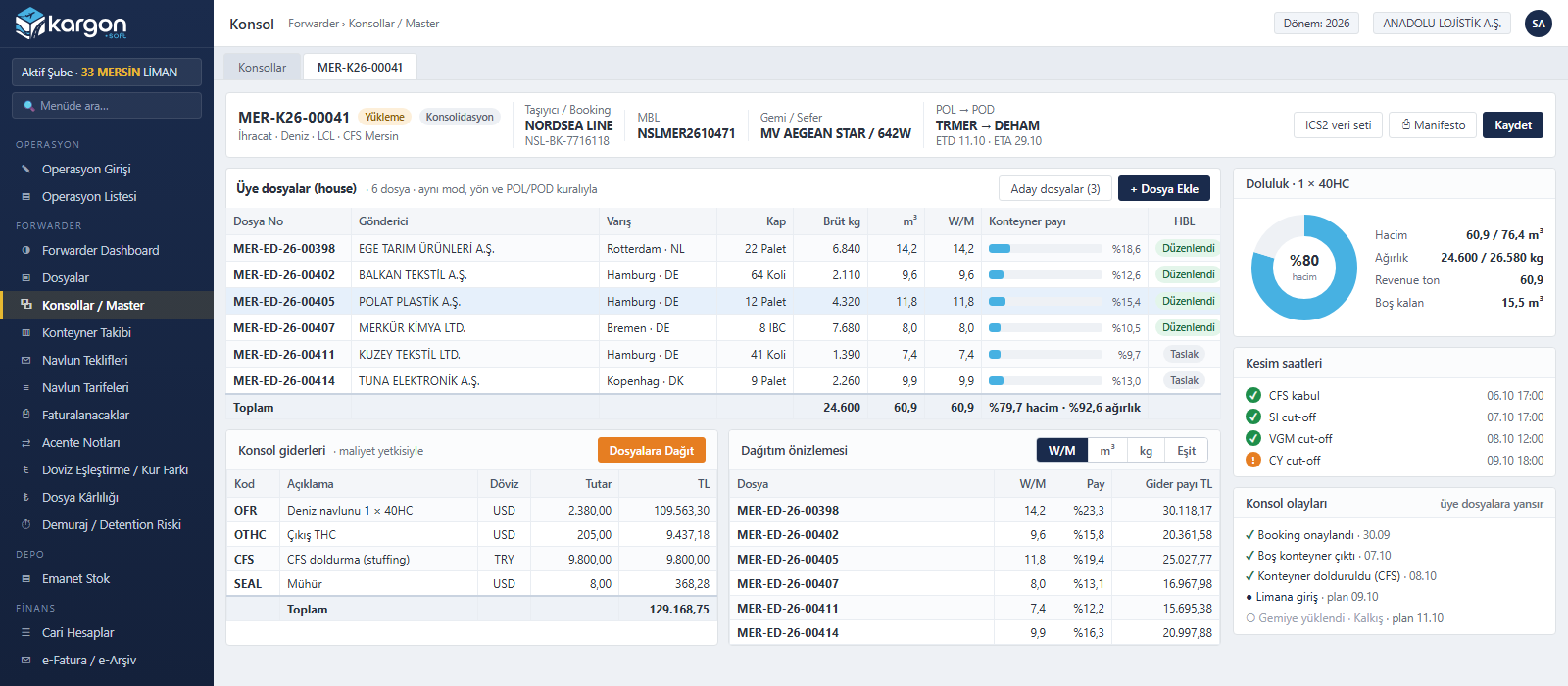
Consolidation (LCL and Air Consols)
Several jobs are grouped under the master (MBL / MAWB) bought from the carrier; matching mode, direction and POL / POD rules are checked automatically. Container utilisation is tracked by volume and weight; consol costs are allocated to jobs by W/M, m³, kg or equally, and consol milestones flow to member jobs.
Routing, Operation Link and Milestones
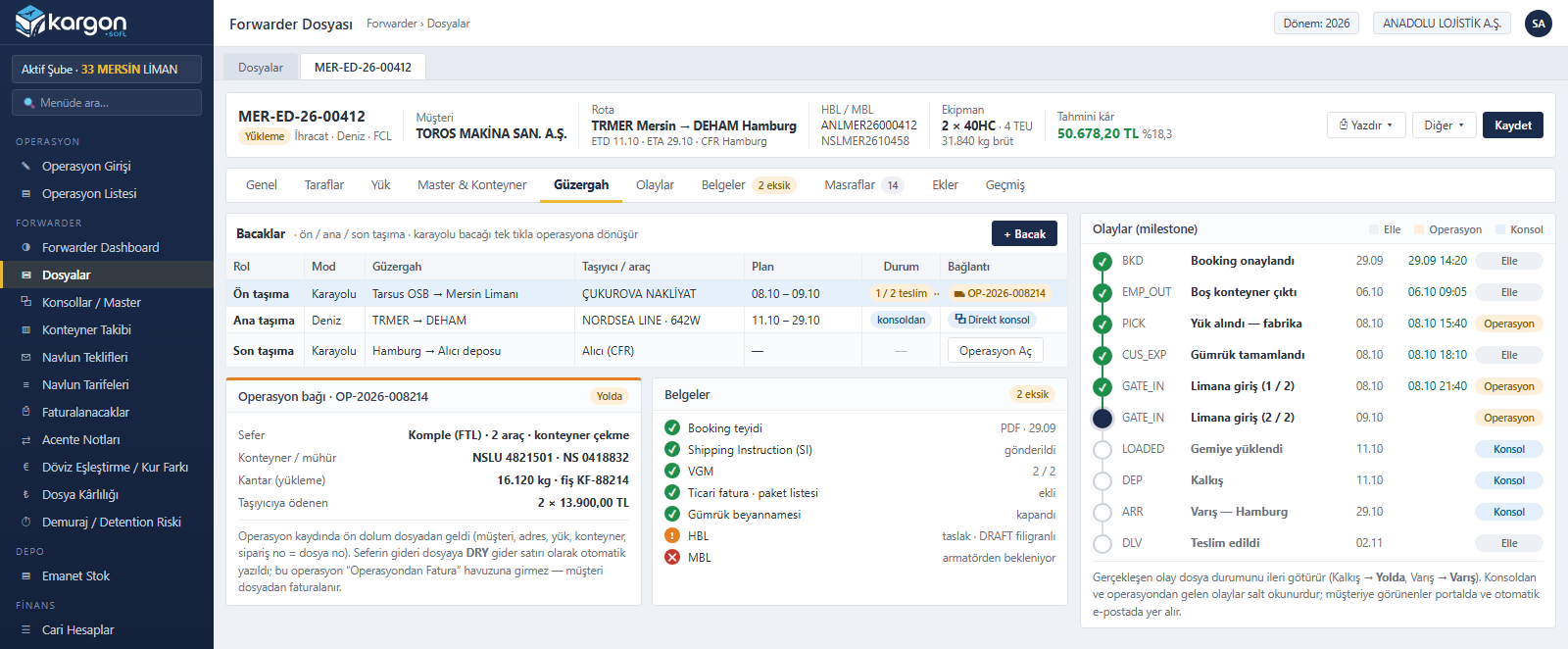
Pre-carriage, main and on-carriage legs are kept on the job. A road leg becomes a Kargon™ shipment operation in one click; the trip's carrier and handling cost is written to the job, and the linked operation is never invoiced twice. Milestones from booking to delivery are tracked with planned and actual dates and move the job status forward on their own.
Freight Rates and Quotes
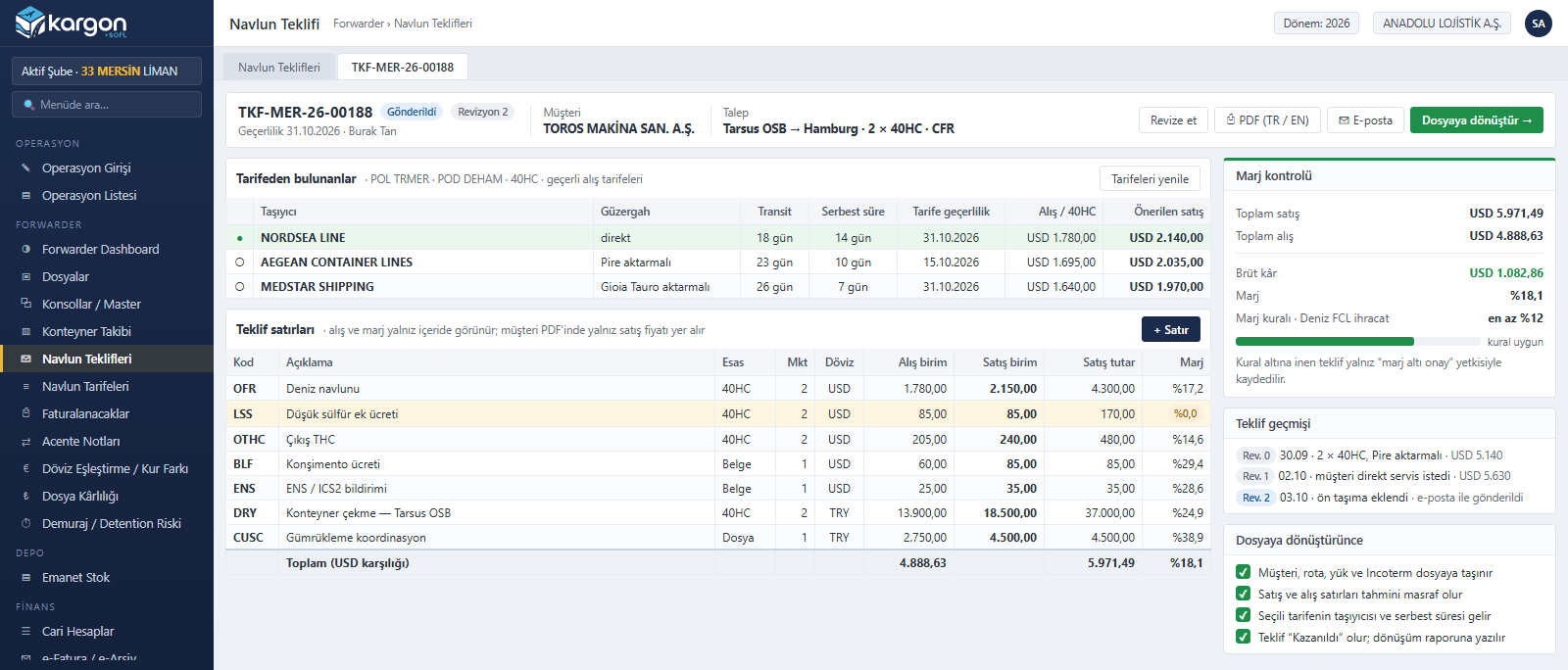
Buy rates are stored by carrier, route, equipment and validity and can be imported from Excel. Matching rates are listed on the quote and the margin rule is checked. Quotes go out as Turkish / English PDF by e-mail, are tracked through revisions and become a job in one click once accepted.
Billing Queue and Multi-Currency e-Invoices
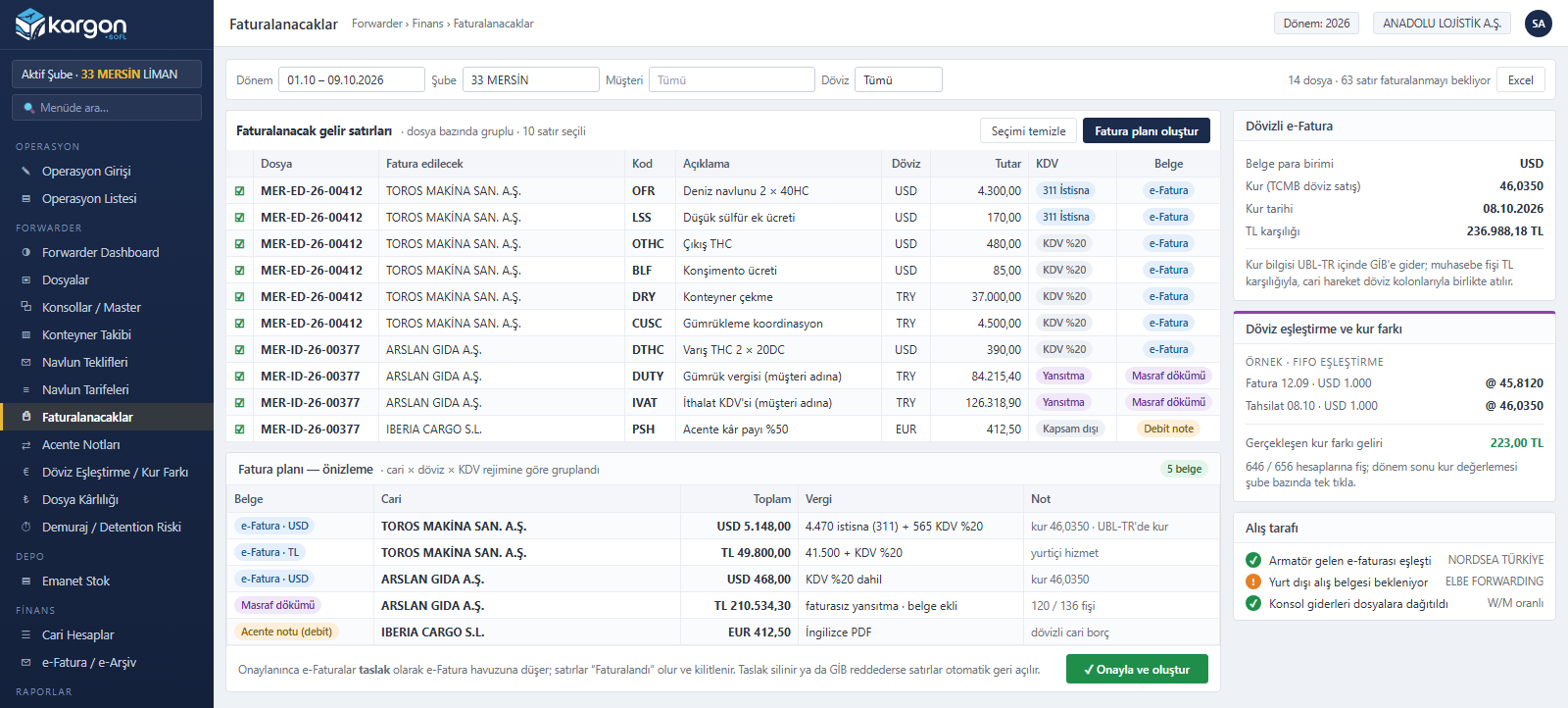
Revenue lines awaiting billing are grouped by account, currency and VAT regime: foreign-currency e-Invoice (rate carried in the UBL-TR document), TRY e-Invoice, disbursement note for payments made on the customer's behalf and agent debit note in a single preview. Foreign-currency receipts and payments are matched FIFO; realised exchange differences and period-end revaluation are posted automatically.
Container Tracking and Demurrage / Detention Risk
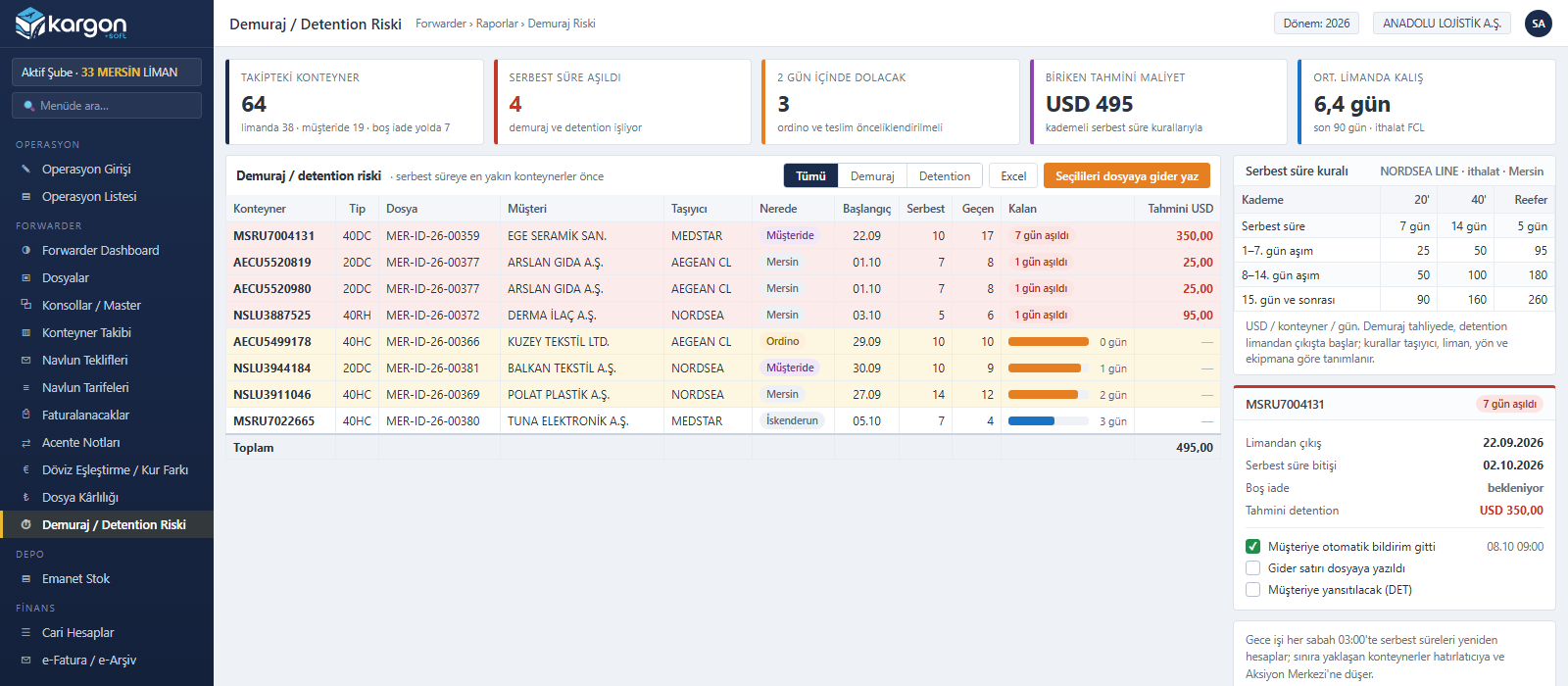
Days at port and at the customer are calculated with tiered free-time rules defined by carrier, port, direction and equipment. Containers closest to the limit are listed first and the accrued cost is estimated; the customer is notified automatically and the amount is written to the job as a cost line in one click.
Process
A forwarding job from quote to close
Each step reuses the record of the previous one; nothing is entered twice.
-
Quote
Buy from rates, sell with a margin rule; Turkish / English PDF.
-
Job
An accepted quote becomes a job in one click; parties, cargo and Incoterm ready.
-
Booking and consol
Carrier, booking, MBL / MAWB, cut-offs; consolidation for LCL.
-
Road leg
Pre- and on-carriage become shipment operations; trip cost flows to the job.
-
Tracking
Milestones, documents, HBL / HAWB, arrival notice, free time.
-
Billing
Foreign-currency e-Invoice, disbursement note, agent note.
-
Close
Purchases matched, FX differences posted, actual profit realised.
Scope
Transport modes and load types
Once the mode and load type are chosen, the job sets up the chargeable quantity, milestone template and document requirements accordingly.
| Mode | Load type | Chargeable quantity |
|---|---|---|
| Sea | FCL, LCL, breakbulk, bulk (tonnage), RoRo | Container, TEU, W/M (revenue ton), tonne |
| Air | Consol, back-to-back, courier, dangerous goods and cold chain | Chargeable kg (configurable volume divisor), weight breaks |
| Road | FTL, LTL / groupage, tonnage | Truck, LDM, kg, m³, tonne; weighbridge ticket and loss |
| Rail | Block train, wagon, container | Wagon, container |
| Multimodal | Sea + road, RoRo + truck, sea + air | Per leg |
Print-outs
Documents ready from the job
HBL / HAWB
Draft watermark; approval and release by permission, configurable number pattern.
Arrival notice
To the consignee with ETA, containers, charges and delivery order details.
Booking confirmation and SI
Booking confirmation to the customer, shipping instruction to the carrier.
Manifest and job sheet
Manifest from the consol, job sheet and ICS2 data set (Excel).
In the same system as FTL, LTL and warehousing
For a logistics company that also forwards, road haulage stays in the shipment module and CFS or bonded warehouse work stays in the warehouse module; the job links to them. Accounts, accounting, e-Invoice and permissions are shared; the module is switched on per company and leaves other workflows untouched when it is off.
Other Kargon™ solutions
LTL and Depot Networks
Partial loads (LTL) and branch networks — Consignment acceptance, transfer hubs, courier assignment and inter-branch settlement
Full Truckload (FTL) and Tonnage
Full truckload and tonnage transport — Trips, freight, subcontractors and fleet cost
International
International transport — Export, import, transit; customs, CMR and foreign currency
Warehousing (WMS)
Warehousing and 3PL services — Goods receipt, addressing, consigned stock, billing
Free demo
See your operation running on Kargon
Let's walk through the modules and screens that fit your business model together in a short online meeting.